DP Studio Ai Photo Editing Prompts – Hello friends, and welcome! In this article, I am going to teach you how to create a unique and trending photo edit. I will show you how to generate these images using AI; by following this article, you will get the specific image prompts needed to create your own images—just like the viral ones you see on social media. Since these styles are currently trending, creating and sharing such photos increases your chances of going viral. So, let’s get started—I will explain the entire process and show you exactly how to use these image prompts to create your images. Please read the article carefully.
Details Of DP Studio Ai Photo Editing Prompts
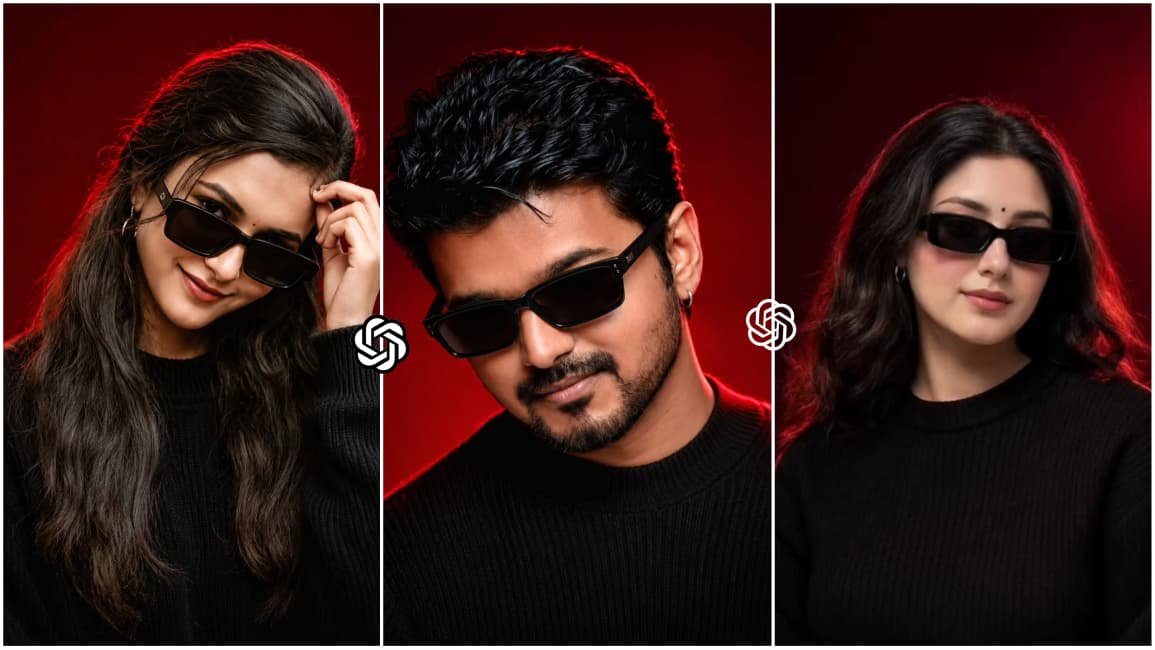
As for the editing of this photo, it is designed to create a realistic DP. You can edit it to generate your own realistic profile picture. The edit transforms your normal photo into a DP where you are wearing a black T-shirt and black sunglasses. The background features a slightly dark red hue that casts neon lighting onto your body, creating an aesthetic vibe. In one version, you appear smiling. In another, you are shown with a serious expression, deep in thought with a finger touching your head, set against a neon-lit background. You will see these variations in the DP editing styles. I will provide the prompts along with the images below so you can understand the process.
What You Need To Do This Editing?
To create this type of edited photo, you will need a reference image so that your face matches the AI-generated image and the result looks realistic. Along with the reference image, you will need specific prompts and an AI tool. In this article, I have provided various image prompts that you can use with an AI tool to create these images. As for the AI tool, you can use ChatGPT or Gemini to generate them. In my opinion, ChatGPT currently delivers the best results, so I recommend using it to generate your images. Let me now provide you with the image prompts and explain in the next paragraph how to use them to create the images.
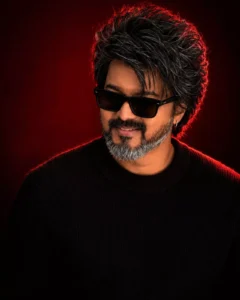
Use the uploaded reference image as the exact identity of the person.

STRICT IDENTITY LOCK:
Preserve 100% facial structure, skin tone, hairstyle, facial features, age, and identity. Do not alter the face, hair, skin texture, or any natural characteristics. Maintain complete likeness to the reference image.

OUTFIT:
Premium black ribbed knit sweater, sleek black rectangular sunglasses, small silver hoop earring, luxury men's fashion styling, clean and sophisticated look.

POSE:
Head slightly lowered, face turned subtly to the side, confident expression, subtle smile, looking slightly past the camera, relaxed yet powerful posture.

SCENE:
Luxury studio portrait, deep crimson-red gradient background, rich dark-red cinematic backdrop, minimal composition, premium editorial atmosphere.

LIGHTING:
Soft beauty lighting on the face, dramatic red rim light outlining the hair and shoulders, cinematic shadows, high contrast, luxury fashion-magazine lighting.

CAMERA:
Chest-up portrait, 85mm lens, shallow depth of field, ultra-sharp facial details, professional DSLR quality, subject in perfect focus.

STYLE:
Luxury men's fashion editorial, viral Instagram portrait, ultra-realistic photography, premium color grading, magazine-cover aesthetic, high-end commercial campaign, cinematic mood, luxury lifestyle branding.

QUALITY:
Photorealistic, 8K detail, natural skin texture, sharp focus, professional retouching, premium fashion photography, highly detailed, realistic lighting.

ASPECT RATIO:
4:5
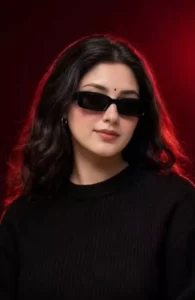
Use the uploaded reference image as the exact identity of the person. STRICT IDENTITY LOCK Preserve 100% facial structure, skin tone, hairstyle, beard, facial features, age and identity. Do not alter face, hair, beard or natural appearance.

OUTFIT Premium black ribbed knit sweater, sleek black rectangular sunglasses, small silver hoop earring.

POSE

Head slightly lowered, face turned slightly sideways, confident expression, subtle smile, looking past camera.

SCENE

Luxury studio portrait, deep crimson-red gradient background, dark red cinematic backdrop, clean minimal composition.

LIGHTING

Soft beauty light, dramatic red rim light around hair and shoulders, editorial lighting, cinematic shadows, high contrast.

CAMERA

Chest-up portrait, 85mm lens, shallow depth of field, sharp facial details.

STYLE

Luxury men's fashion editorial, viral Instagram portrait, ultra realistic, DSLR quality, premium color grading, magazine cover aesthetic.

Aspect Ratio 4:5
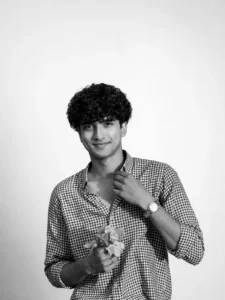
Change the background to a clean, professional studio white background. The subject should remain sharp and natural, with soft, even studio lighting, minimal shadows, and High-key look, realistic colors, and smooth edges around the subject.” Keep the face as same and change the lighting to very ultra realistic studio lighting and also keep the cutout as clean as possible if someone looks they think it was taken in the studio give a one side lighting and keep the photo black and white.
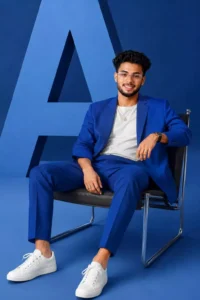
Minimalist fashion studio photoshoot featuring stylish people sitting confidently on a modern chair, monochromatic aesthetic, subjects wearing bold cobalt-blue outfits (tailored suit or modern streetwear set) with white sneakers and clear glasses, relaxed powerful pose with legs apart and hands resting naturally, clean blue studio background with a large geometric letter “A” behind them, soft professional studio lighting, fashion editorial composition, modern luxury brand campaign style, ultra- realistic, sharp focus, high detail, 8K.
How To Create Image Using Chatgpt?
Creating this photo is incredibly easy; you can do it using an AI tool called ChatGPT. First, download the ChatGPT app from the Play Store—it is available for free. Next, copy any of the image prompts provided in our article. Open the ChatGPT app, paste the prompt, and use the plus icon to add a reference image so that the resulting AI image matches your face. Finally, click the generate button, wait a few moments, and your AI-generated photo will be ready. The entire process is completely free.
Conclusion
This is how you can easily create trending and viral photo edits. I have already explained all the steps to you; simply follow them to create your images. Also, if you want more unique, trending photo prompts, you can find them on our website. There, you will get access to countless unlimited image prompts for free, which you can use to create your own images. I hope you enjoyed this article. Please feel free to share it if you liked it.