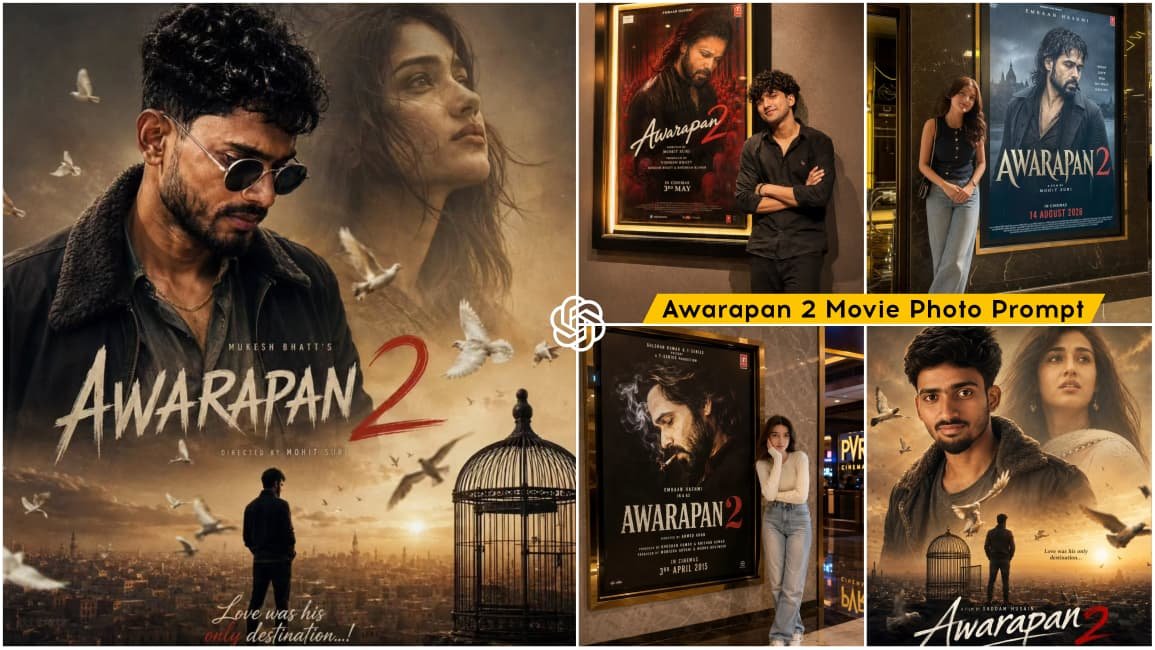
Awarapan 2 Movie AI Photo Editing Prompt – Friends, a new photo editing trend is currently going viral on social media, where people are creating realistic movie poster-style images and sharing them online. This trend is based on the Bollywood movie Awarapan 2, and Emraan Hashmi’s fans are especially interested in creating these edits.
Many people are creating photos that make it look as though they have actually visited a theatre and clicked a picture in front of the movie poster. Even if someone cannot visit the theatre, AI makes it possible to create a similar realistic image using a reference photo and a suitable prompt. In today’s article, I’ll share different Awarapan 2 AI Photo Editing Prompts and explain the complete process so you can easily create your own movie poster-style image.
Details Of Awarapan 2 Movie AI Photo Editing Prompt
As mentioned above, this editing is based on a realistic movie poster concept. Your photo is generated in such a way that it looks like you are standing inside a cinema hall or theatre beside an Awarapan 2 movie poster.
The scene can show a large movie poster displayed on a wall, while you stand beside it in a natural and stylish pose, similar to someone taking a photo after visiting a theatre. The lighting, shadows, perspective, skin texture, clothing, and background details are designed to create a realistic camera-captured appearance. The main advantage is that you only need a clear reference image of yourself. With the right prompt, the AI can generate the complete theatre-style environment around your photo. I’ll provide the required prompts in this article so you can create different variations of the same concept.
How To Create Awarapan 2 Photo?
Creating this Awarapan 2 AI photo is quite simple. Different image prompts are provided in the article, along with examples of the type of image you can create. First, select the style you like and copy its corresponding prompt. After that, open an AI image-generation tool such as Google Gemini or ChatGPT that supports image generation and reference images. Add your clear reference photo using the Plus (+) option and then paste the copied prompt.
Once you submit the prompt, the AI will process your reference image and generate the requested movie poster-style scene. After a few moments, your Awarapan 2-themed image will be ready. You can then save it and share it on social media. For the best result, use a clear, high-quality reference photo where your face is clearly visible. This helps the AI maintain more accurate facial details while generating the new scene.
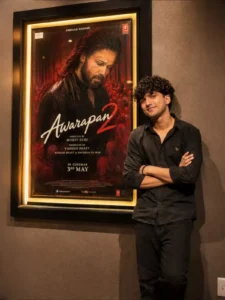
Use the uploaded photo as the STRICT IDENTITY REFERENCE for the person standing beside the cinema poster. Replace ONLY the person standing beside the poster with the person from the uploaded photo. Preserve the person’s exact recognizable identity, facial structure, facial proportions, eye shape and spacing, eyebrows, nose, lips, jawline, cheeks, chin, skin tone, hairstyle, hairline, beard/facial hair if present, and natural body proportions. Keep the person clearly recognizable as the same individual from the uploaded reference. No face-swap artifacts, no beautification, no face reshaping, no identity drift, no artificial facial changes.Keep the original Awarapan 2 movie poster featuring Emraan Hashmi EXACTLY unchanged inside the cinema frame. Do not modify, regenerate, replace, redesign, crop, reinterpret, or alter any part of the poster. Preserve Emraan Hashmi, his appearance, the Awarapan 2 title, red monks/crowd background, poster artwork, colors, typography, credits, lighting, composition, and all visible details exactly as shown in the reference.Create an ultra-realistic premium cinema hall photograph. A large illuminated cinema poster frame is mounted on a textured wall, with the original Awarapan 2 poster clearly visible inside the frame. The uploaded person is standing naturally beside the poster, leaning slightly against the wall with folded arms and a subtle confident smile, looking directly toward the camera. The person is wearing a realistic casual black outfit with natural fabric texture and folds. Maintain realistic anatomy, natural posture, correct proportions, realistic hands and fingers, and believable interaction with the wall and environment.Match the reference image as closely as possible: same camera angle, same framing, same poster position, same cinema display frame, same wall texture, same lighting direction, same perspective, same subject placement, same relative scale, same shadows, same reflections, and the same overall composition. Do not add unnecessary people, objects, advertisements, signs, logos, or additional posters.Create realistic cinema-lobby lighting with warm cinematic illumination, natural ambient shadows, subtle reflections on the poster glass, realistic wall texture, physically accurate light falloff, and authentic movie-theater atmosphere.Make the final image look like a genuine professional DSLR photograph with natural skin texture, realistic facial details, accurate colors, realistic depth of field, subtle cinematic bokeh, high dynamic range, physically accurate lighting, realistic reflections, detailed materials, and professional photographic quality.ONLY replace the person standing beside the poster. Everything else must remain unchanged.No illustration, no painting, no 3D render, no cartoon effect, no artificial face, no face-swap artifacts, no identity drift, no poster alteration.Aspect ratio: 9:16 vertical.
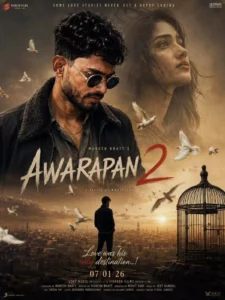
A cinematic movie poster for a dramatic film titled "Awarapan 2." In the foreground, a rugged, intense man with dark hair and a beard stands prominently, wearing a dark jacket with a fur-lined collar over a gray shirt. In the background, there is a large, ethereal, and slightly translucent portrait of a woman looking upward with a melancholic expression. In the center-bottom, a lone man stands in a landscape overlooking MUKESH BHATT'S a sprawling, dusty city at sunset. A large birdcage is placed near him, and a swarm of pigeons is flying throughout the AWARAPAN scene, adding a sense of movement, posters include a tagline "Love was his only destination...!", all set against a nostalgic, sun-drenched, and emotive atmosphere., Several white pigeons are flying across the scene, creating a sense of motion and contrast against a warm, and cinematic atmosphere 32k ultra hd enhance make the espect
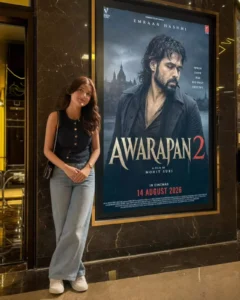
Use the uploaded photo as a STRICT IDENTITY REFERENCE. Keep the face, hairstyle, expression, skin tone, outfit, hijab/hair, body proportions, and overall appearance 100% identical. No beautification, face editing, Al face replacement, or age modification. Recreate an ultra-realistic luxury cinema lobby with the person naturally standing beside the giant illuminated original Awarapan 2 poster featuring Emraan Hashmi. Keep the poster completely unchanged, including title, typography, colors, background, release text, frame, and placement. Use premium marble walls, polished floors, realistic reflections, warm golden lighting, glass surfaces, and cinematic depth of field. Preserve camera angle and composition. Add realistic shadows and DSLR photography quality. Add "Talib Editz" bottom-right. 8K HDR, 4:5 vertical.
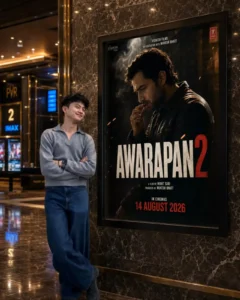
Use the uploaded photo as a STRICT IDENTITY REFERENCE. Keep the person's face, hairstyle, expression, skin tone, outfit, body proportions, and overall appearance 100% identical. No beautification, face editing, Al face replacement, or age modification.SCENE: Create an ultra-realistic luxurycinema lobby photograph. Place the uploaded person naturally beside a giant illuminated Awarapan 2 movie poster display mounted on a premium marble wall. The person should be looking naturally toward the camera with a realistic, elegant pose.SUBJECT: Preserve the exact uploadedclothing, hairstyle, facial features, skin texture, body proportions, and identity. Do not alter or redesign the outfit. Maintain realistic body posture, natural hands, accurate anatomy, realistic shadows, and authentic reflections.POSTER LOCK - VERY IMPORTANT: Keep the original Awarapan 2 movie poster completely unchanged. Do not modify Emraan Hashmi, the AWARAPAN 2 title, typography, colors, character appearance.
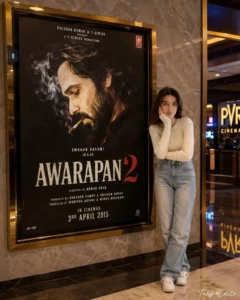
Use uploaded photo as STRICT IDENTITYREFERENCE. Keep face, hairstyle, expression, skin tone, outfit, hijab/hair, body proportions and overall appearance 100% identical. No beautification, no face editing, no Al face replacement, no age modification.EXACT SCENE RECREATIONUltra-realistic luxury cinema lobby photograph. Subject standing naturally beside a giant illuminated Awarapan 2 movie poster display mounted on a premium marble wall. Original Awarapan 2 poster featuring Emraan Hashmi remains completely unchanged.Luxury PVR/IMAX cinema environment, warm golden ambient lighting, polished marble floor reflections, realistic glass surfaces, premium theater atmosphere.SUBJECT POSITIONThe uploaded person standing beside the movie poster, naturally posing for a photo.If male: confident casual pose.If female: elegant natural pose.Same clothing as uploaded photo.Same face and identity preserved exactly.Looking toward camera.Realistic shadows and reflections.POSTER LOCK
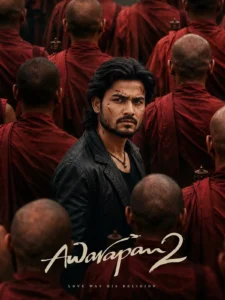
Use the uploaded reference image ONLY as the identity/face reference for the central male character. Preserve the person's facial identity, facial proportions, skin tone, eyes, nose, lips, jawline and overall recognizable appearance. Do not copy any existing poster or movie image.Create a vertical 9:16, ultra-realistic, high-end Bollywood crime-drama movie poster with a dark, intense, mysterious and emotionally powerful atmosphere.CENTRAL CHARACTERPlace the reference person as the main character in the exact visual position of a cinematic hero standing in the middle of a dense crowd.He is shown from approximately the waist/chest up, slightly turned sideways while his head turns toward the camera. His shoulders and body are angled slightly away from the viewer, but his face looks directly toward the camera..Give him a very serious, angry and emotionally exhausted expression:deeply furrowed eyebrowsintense, piercing eyes slightly narrowed eyestight lipsstrong, serious jawsubtle expression of pain, anger and determination.no smilenatural realistic facial tensionHAIR & BEARDTransform the person's hairstyle into medium-long, thick, naturally messy dark black hair, swept backward with loose strands around the sides and slightly longer hair at the back.Add a full, naturally grown dark beard and moustache, masculine and slightly rugged rather than perfectly groomed.The beard should look realistic and naturally connected to the person's original facial structure.FACE MARKS/WOUNDSAdd several small, realistic superficial scratches and dried-blood marks on the face, especially:or two thin scratches near the forehead/templea small scratch on the cheeka few subtle dried-red marks around the beard/cheek areaKeep the marks cinematic and realistic, not gory or exaggerated. The person's face must remain clearly recognizable.OUTFITDress the character in:jacket black slightly worn leather jack simple black/dark crew-neck shirt underneathsubtle black necklace with a small pendantThe jacket should have realistic leather texture, natural folds and slightly rugged detailing.BACKGROUNDSurround the central character with a large crowd of bald Buddhist-style monks wearingMost monks should be facing away from the camera, creating a crowded wall of red robes around the central character.deep red/maroon robes.Some monks should be:close to the camera and partially blurredpositioned in the foregroundpositioned behind the characterpartially blocking the lower and side portions of the frameThe central character must remain the clear visual focus.Add a few subtle traditional metallic prayer/ritual objects among the crowd.COMPOSITIONUse a highly cinematic composition:central character positioned slightly below the vertical centercrowd surrounding him from every direction foreground monks larger and slightly out of focusbackground monks progressively softer and more atmosphericcentral character sharply focusedstrong depth of fieldnatural perspectiverealistic crowd densityno empty backgroundThe image should feel like a frame from a big-budget Indian crime/thriller film.LIGHTING & COLORUse dark cinematic lighting with warm muted tones.Dominant colors:deep maroon/red robesblack clothing dark brown shadowswarm skin tonessubtle golden highlightsUse soft directional cinematic light on the central character's face, creating dimensional facial shadows while keeping his eyes clearly visible.cinematic color grade.Add subtle film grain, atmospheric haze, realistic shadows and a slightly desaturatedCAMERA/QUALITYProfessional cinema-camera photography look.vertical 9:16 compositionrealistic 50mm cinematins.shallow depth of fieldsharp fasialporés realistic hair strandsrealistic beard texturerealistic leather textureTEXTnatural skin texturecontr cinematic contrastsubtle film grain ultra-detailedphotorealisticpremium theatrical movie-poster quality4K/8K-level detailAt the bottom of the poster, add elegant handwritten cinematic title typography:"Awarapan 2"Use large cream/off-white brush-script lettering with a sophisticated Bollywoodmovie-poster aesthetic.Under the title, add a small elegant tagline:"LOVE WAS HIS RELIGION"Keep the typography integrated naturally into the composition without covering thecharacter's face.IMPORTANT IDENTITY RULEThe uploaded reference photo is the only identity reference. Keep the person's face recognizable and consistent. Do not replace the face with another person. Do not make the character look like a celebrity. Do not alter the fundamental facial structure.NEGATIVE PROMPTAvoid cartoon/anime appearance, artificial Al skin, plastic skin, excessive beauty retouching. distorted face, different person, extra limbs, deformed hands, duplicate character, oversized head, unnatural beard, fake-looking hair, excessive blood, gore, exaggerated wounds, smiling expression, bright cheerful colors, modern casual background, empty background, low resolution, blur on the main face, bad typography, misspelled title, watermark, logo, excessive sharpening, oversaturated colors.
Why Is This Editing Going Viral?
This photo editing trend is gaining attention because of the popularity and buzz surrounding Awarapan 2. Emraan Hashmi has a strong fan following, so fans naturally create content based on the movie. Another reason behind the trend is the increasing use of AI image-generation tools. People can now create realistic theatre and movie-poster scenes without actually visiting the location. By combining a reference photo with a detailed prompt, creators can generate images based on their imagination and share them on social media. Because movie-related content often receives quick attention during a trending period, creators are experimenting with these AI poster edits to participate in the trend and make their content more engaging.
Conclusion
So friends, this is how you can create a Viral Awarapan 2 Movie Poster AI Photo using a reference image and an AI prompt. In this article, I explained the concept, shared the complete creation process, and described how you can generate a realistic theatre-style image with your own photo.
Choose a clear reference image, use the appropriate prompt, and generate your preferred Awarapan 2 poster-style edit. For more unique and trending AI photo editing prompts, keep visiting our website, where we share new prompts and editing ideas regularly.