Ram Navami AI Photo Editing Prompts – Hello friends! I have been quite busy with work for some time now, which is why I haven’t been posting any new content lately. However, in today’s article, I am going to provide you with photo editing prompts specifically for Ram Navami. As you may already know, the festival of Ram Navami in 2026 is just around the corner, and people have already started creating photos for the occasion. Therefore, in this article, I will share a selection of prompts that will enable you to generate your very own AI images for Ram Navami. Moreover, these images will turn out to be incredibly realistic. Let’s dive in and explore the entire process.
Details of Ram Navami AI Photo Editing Prompts
In this editing tutorial, we are going to generate photos specifically for Ram Navami. You will be able to create various types of images, each featuring a realistic depiction where your face is seamlessly integrated and perfectly matched. Friends, just as processions are held and Lord Ram is worshipped on the day of Ram Navami, our images will capture that very same atmosphere—making it look as though we ourselves are celebrating the festival and participating in the procession. We will be creating a variety of such images, including ones where we are holding a saffron flag. I will explain the entire process to you in the paragraphs that follow, utilizing the assistance of ChatGPT.
How To Create Your Ai Image
Friends, now select the image prompt you wish to use and copy it; then, click on the “Create Your Image” button. This will redirect you to the ChatGPT website. However, you can also utilize other tools, such as Google Gemini. Since the process is identical for both, simply open either ChatGPT or Gemini, paste the prompt there, and use the plus icon to upload an image of yourself in which your face is clearly visible. After adding the image, click on the “Generate” button. After waiting a few moments, your image will be ready.
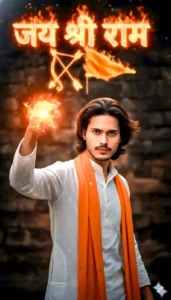
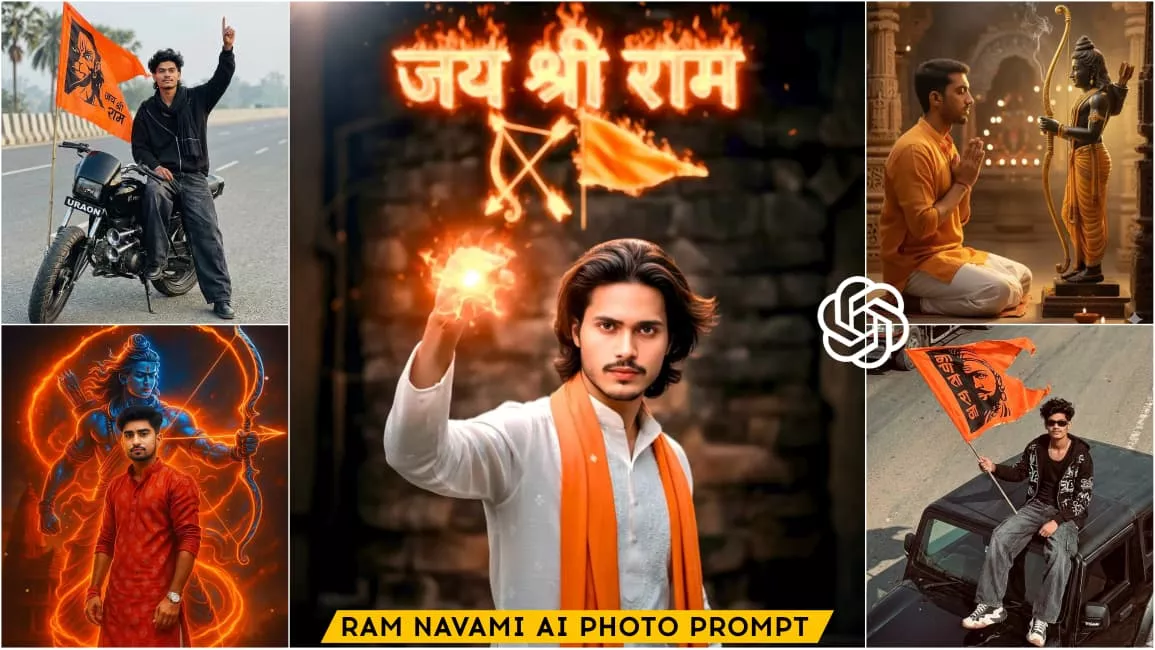
A powerful dynamic portrait of a person in a white kurta and an orange stole raising theirright hand with a fist holding a gowing object Behind them, in the background, long hair and alarge stylized Hindi word (Jay Shri Ram ) is written in fiery glowingletters with a bow and arrow symbol and an orange flag next toit The overallighting is dramatic with warm fiery tones emanating from the gowing elements creating a strong contrast with the darker background.
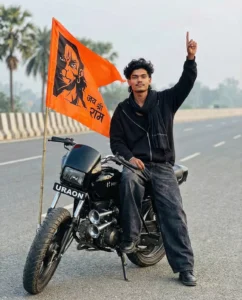
ULTRA-REALISTIC 8K PORTRAIT OF A STYLISH YOUNG MAN [KEEP IT REAL FACE FROM UPLOADED IMAGE]
A HYPER-REALISTIC, CINEMATIC CLOSE-UP SHOT OF A YOUNG MAN WITH VOLUMINOUS, MESSY DARK WAVY HAIR AND A CLEAN TAPER FADE ON THE SIDES AND THE BACK OF THE HAIR IS LONG AND FLOWS DOWN TO THE NAPE OF THE NECK, SITTING CONFIDENTLY ON THE MODIFIED BLACK MOTORCYCLE (HERO SPLENDOR STYLE) IN THE MIDDLE OF A QUIET ASPHALT ROAD WITH ONE LEG BENT ON THE BIKE AND THE OTHER FOOT RESTING ON THE ROAD THE MOTORCYCLE IS FULLY VISIBLE IN SIDE PROFILE, BLACK ALLOY WHEELS, BLACK EXHAUST, MUSCULAR FUEL TANK. HE IS WEARING A BLACK OVERSIZED ZIP-ZAPPED HOODIE OVER A BLACK GANJI WITH DRAPPED BLACK GAMCHA AROUND HIS NECK AND EXTREMELY BAGGY, WIDE-LEG DENIM JEANS IN A FADED CHARCOAL BLACK WASH. THE JEANS HAVE A VINTAGE TEXTURE AND PUDDLE OVER BLACK BOOTS. HE IS HOLDING A LARGE, WAVING SAFFRON-COLORED FLAG THAT FEATURES A BOLD BLACK GRAPHIC OF LORD HANUMAN AND THE TEXT "JAI SHREE RAM" IN HINDI. HE HAS ONE ARM RAISED HIGH, POINTING HIS INDEX FINGER TOWARD THE SKY WITH A PROUD EXPRESSION AND LOOKING AT THE CAMERA. THE MOTORCYCLE FEATURES PROMINENT DUAL SILVER AIR HORNS ON THE SIDE AND THE TEXT "URAON" WRITTEN IN BOLD WHITE LETTERS ON THE FRONT NUMBER PLATE AND AN EXTRA-WIDE, CHUNKY OFF-ROAD TIRE IN THE FOREGROUND. THE BACKGROUND FEATURES A HAZY MORNING SKY, DISTANT PALM TREES, AND A CONCRETE HIGHWAY BARRIER. 8K RESOLUTION, PROFESSIONAL PHOTOGRAPHY, SOFT NATURAL LIGHTING
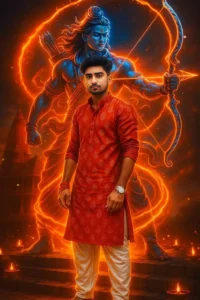
Dynamic diwali portrait of A Indian 20-year-old man ( face as it's uploaded image) in modern printed hand folded kurta, pajama without shoes, standing confidently in the beside of the ram mandir and a fiery neon mystic bigger than me Lord Ram with bow and arrow spirals around him, wrapping his body in blazing energy. The lord ram design is holographic, luminous red-orange with electric blue highlights. Cinematic devotional fantasy diwali aesthetic, VFX, diwali atmosphere
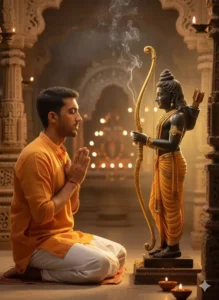
“Create a divine and ultra-realistic photo of a man performing Lord Ram’s pooja with full devotion. Lord Ram looks beautiful and graceful, holding a shining bow (dhanush) in his hand, surrounded by a soft golden divine glow. The background has a peaceful temple atmosphere with diyas and incense smoke. The man (me) is shown respectfully praying, his real face 100% clear, natural skin texture, same expression and hairstyle. Lighting should be warm, cinematic, and DSLR-quality with smooth
Compare Between 1st And 2nd Prompt Editing
Friends, if we compare the prompts used for the first and second images, we will observe that these two prompts generate images with entirely distinct editing styles. Each prompt contains a unique set of details. In the first image, you will notice yourself wearing white attire with a saffron-colored gamcha draped over your body, set against a background featuring neon text that reads “Jai Shri Ram.” Conversely, the prompt for the second image includes details depicting you seated on a black motorcycle; the bike features a saffron-colored flag bearing an image of Lord Hanuman, inscribed with the words “Jai Shri Ram.” This photograph looks as though you are participating in a Ram Navami procession and have paused somewhere along the way to have a picture taken; the image appears completely realistic and natural. Friends, similarly, various other accounts have created edits incorporating a wide array of distinct details.
Conclusion
So friends, this is how you can create a photo edit for Ram Navami. Your face will blend seamlessly into the image, resulting in a completely realistic final product—one that perfectly captures the festive atmosphere and devotional spirit of Ram Navami worship. We have provided various image prompts in different styles here; simply choose the one you like best to generate your own image. We hope you enjoy this article!