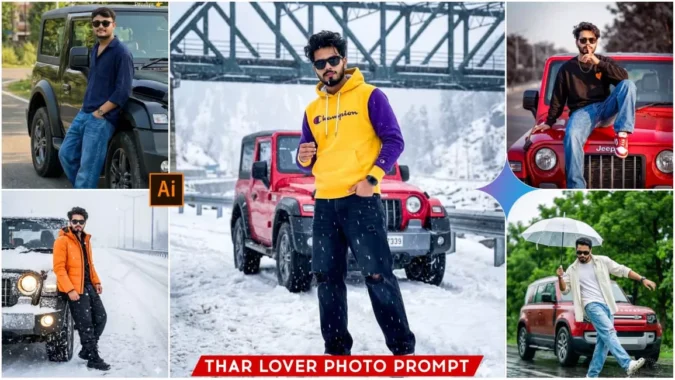
Thar Lover Ai Photo Prompts – Look, we all dream of buying our own car and taking pictures with it. Shooting videos with it. It’s a common dream for many guys to buy a car in their youth, once they’re financially independent, and take great photos and videos with it. If you also have this dream, and you want to have photos with your favorite car but it’s not possible right now, you can fulfill this wish because photo editing has become incredibly easy these days. We can get professional-looking edits without any video editing skills. And in this article, I’m going to teach you a trending AI photo editing technique where you’ll see yourself in pictures with your favorite car. For example, in India, many people’s favorite cars are the Scorpio or the Mahindra Thar. So, in this editing process, we’ll add some cars like these to your photo, creating a realistic image with your face and your dream car. This process is very easy, and I’ll teach you how. Just keep reading the article.
About This Thar Lover Ai Photo Prompts
So friends, first let’s understand what kind of photo editing we’ll be doing and what kind of prompts are provided. You should have some basic information about them. You see, with this type of photo editing, we don’t need to do much. I will explain the process later. First, let’s learn about the photo editing itself. In the photo, you’ll see yourself posing with your favorite car. In the example photo, a Mahindra Thar has been used. You can change the car name in the prompt to any other car you like, and then when the image is generated, that car will be displayed. IIn one image, we see ourselves standing next to our car, in a photoshoot pose, and snow completely covers the environment, as winter is currently here. So you can create this type of image, as if you’ve gone on a trip somewhere cold, like Manali, a tourist area where it’s currently cold. This will make the photo look realistic. In another photo, there’s a normal environment, like in summer, and we’re sitting in the car or standing next to it. We create our photos in different styles in a completely realistic way. I give the prompts below the image. You will see some images below, and their prompts are also provided. You can use whichever image you like to create your own image.
Why Should We Used Google Gemini
Look, we’ll find many tools for photo editing, but if we want to create a realistic and natural-looking image that doesn’t look like it was created by AI, then you can use Gemini. Gemini easily provides all these qualities, and nowadays, everyone is using Gemini to create their photos. So, if you use Gemini, you’ll experience its benefits. Your face in the generated image will match your real image perfectly, just as you provided it to Gemini along with the prompt. And friends, using Google Gemini is very easy. It creates a realistic image for us completely free of charge, which is why we prefer using Google Gemini. I’ll also show you the steps on how to open Gemini and create your image using a prompt.
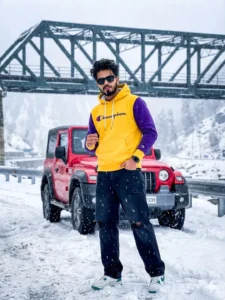
Create an ultra-realistic cinematic photograph using the provided reference image, keeping the face **100% exactly the same** with no edits, no reshaping, no beautification, and fully natural skin texture and sharp beard details; depict one young man (age 22–30), full body visible, standing casually on a heavy snowy rain roadside in a Snow King / Snow Lord pose, with one hand in his pocket and the other slightly raised like a relaxed kingly gesture, confident calm expression, slight head tilt, looking directly at the camera, relaxed posture leaning slightly near a vehicle; outfit must remain **exactly the same** with no changes: yellow hoodie with purple sleeves, Champion-style logo on the chest, loose black ripped denim jeans, white-green winter sneakers, luxury black sunglasses, black Apple smartwatch, well-groomed beard, and the same hairstyle; maintain a realistic winter cinematic mood with heavy snow-mixed rain, snow-covered roadside background, natural lighting, ultra-high detail, true human realism, and no alterations to face, clothing, pose, or environment.
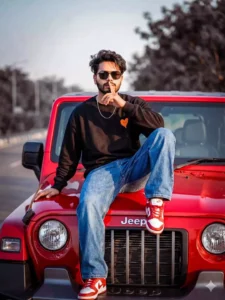
Create an ultra-realistic full-body photograph using the provided reference image, keeping the **face 100% original and completely unchanged**, with absolutely no face reshaping, no beauty filter, no AI facial modification, and preserving real skin texture, exact facial features, natural expression, and true identity; depict a young man (age 18–22) with **normal, natural body proportions**, sitting confidently on the front bonnet of a red luxury Jeep (Wrangler / Thar style), with one leg folded on the bonnet and the other leg hanging down casually, one hand resting on the bonnet for support and the other hand raised near the lips in a cool “shhh / attitude” gesture, relaxed shoulders, confident posture, and a calm, stylish street-attitude expression; outfit must remain in the **same style with no changes**, featuring a black and orange small-heart oversized sweatshirt, loose-fit blue denim jeans, red and white sneakers, black round or oval sunglasses, a thin silver chain necklace, minimal casual accessories, and messy textured hair with volume on top, rendered in ultra-high realism with natural lighting, sharp details, and a true human cinematic look, without altering face, body proportions, pose, clothing, or overall realism.
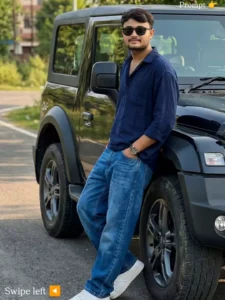
Use uploaded image as strict face reference.
Face must be 100% identical (no change in eyes, nose, lips, beard, hairstyle, skin tone).
Ultra-realistic cinematic photo of the same Indian man, leaning casually on a black SUV (Thar-style) on a road with greenery.
Same black sunglasses, navy blue shirt, blue jeans, white sneakers, wristwatch.
One hand in pocket, relaxed confident pose.
Natural daylight, soft shadows, cinematic depth of field, DSLR look, sharp focus, 4K quality.
Negative: cartoon, anime, blurry, face change, different person, bad anatomy, watermark, text.
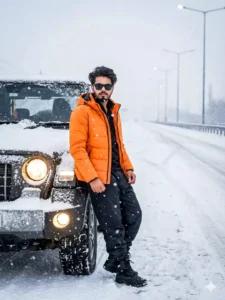
Create a realistic photo of a young Indian man wearing a bright orange winter jacket, black outfit and boots, leaning against a black off-road SUV on a snow-covered highway during snowfall.
He has styled hair, trimmed beard, black sunglasses, and a confident pose.
Background shows a foggy empty road with streetlights, overcast winter daylight, cinematic, ultra-realistic DSLR look.
Create an ultra-realistic, cinematic full-body photograph of one young man (age 22–30) using the **uploaded reference image for the face**, keeping the face **100% exactly the same with no changes at all**—no reshaping, no beautification, no filters—preserving natural skin texture, sharp beard details, the same hairstyle, and a real human look; the subject is standing casually on a snow-covered roadside during heavy snowy rain, leaning slightly near a vehicle, striking a confident “Snow King / Snow Lord” pose with one hand in his pocket and the other slightly raised like a relaxed king on a throne, head slightly tilted and calmly looking toward the camera with a confident winter-vibe expression; outfit must remain **identical** with no changes: yellow hoodie with purple sleeves and a Champion-style logo on the chest, loose black ripped denim jeans, white-green winter sneakers, luxury black sunglasses, and a black Apple smartwatch; lighting should be cinematic and moody with realistic winter atmosphere, cold tones, visible snow and rain, high detail, sharp focus, photorealistic textures, and no alteration to the face, outfit, or overall identity from the reference image.
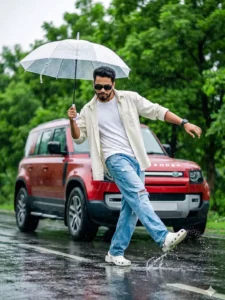
Create an ultra-realistic cinematic fashion photograph of a stylish young man dancing on a wet road during light rain, captured in a dynamic mid-step pose with one foot splashing water on the reflective surface and arms naturally balanced in a freestyle dance motion, freezing authentic movement with a confident, carefree attitude; he wears black rectangular sunglasses, a black Apple smartwatch on his left wrist, an off-white oversized open shirt layered over a white round-neck t-shirt, loose light-blue ripped denim jeans, and white Crocs footwear, maintaining a clean modern style; his expression is focused and cool, looking slightly downward with calm confidence and no forced smile; he holds a white transparent umbrella in one hand, slightly tilted with visible rain droplets; the background features a lush green, tree-lined road under a soft rainy atmosphere, with a red Land Rover Defender luxury SUV parked behind him, subtly blurred to create cinematic depth of field and emphasize the subject.
How To Create Image With These Prompts
Look, Gemini has become so popular in the field of photo editing that now everyone knows how to use it. If you already know how to use it, you can use it directly, but if you don’t know how to create realistic photos using Google Gemini, photos that don’t look like they were created by AI, then read this paragraph. I will tell you all the steps. First, to create an image, we will need a prompt. I have provided different types of prompts here. Copy the prompt for the type of image you want to create, and then click on the “Create Your Image” button. This will take you to the official Gemini website. If you have used Gemini before, you won’t need to log in, otherwise, log in with your Gmail account. After that, paste the prompt you copied into the dashboard below. Then, you will see a small plus icon at the bottom of the dashboard. Click on it and add a realistic image of yourself where your face is clearly visible. A clear face is necessary for the AI-generated image to accurately match your face. After adding your photo, click on the send button and wait a few moments. Gemini will then create the image, and it will provide a realistic image where you are standing next to a car or sitting on top of a car, depending on the prompt you pasted.
Conclusion
This way, you can create a realistic image of a car that looks so real that no one will be able to tell it was created by AI. Only experienced people might be able to recognize that AI generated it, and it’s even going viral. I hope you liked the method I taught and explained, and that you were able to create your own image. If you want to keep getting prompts for trending images like this, keep visiting this website. I will continue to provide you with prompts for creating trending images.
