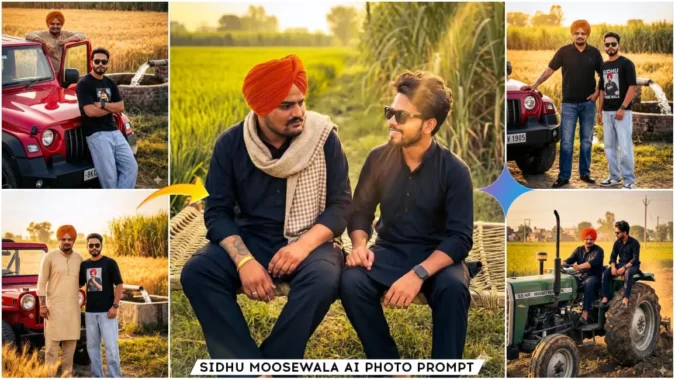
Sidhu Moosewala Ai Photo Prompts – Look, in this article I am giving you some very unique photo editing prompts with the help of which you can do this photo editing using Google Gemini or any ai tool. If you are a fan of sidhu musevla and you want to make a realistic photo of yourself with him that looks absolutely real, then you can do it today with the help of prompts given in this article. This prompt is designed in such a way that you will be able to create a realistic image with Sidhu Moosevala from one of your own photos. So friends, read the article and I will tell you all the things.
About Sidhu Moosewala Ai Photo Prompts
Friends In Prompt you will see that you are sitting with Sidhu Moosewala on his tractor and he is driving. So in some image you are sitting with them on the cot in the field. Like the fields of Haryana Punjab. And the atmosphere will be absolutely realistic. In any image, you will be seen standing near them and clicking the photo. You can create such different images. I will give you their prompt below the image so you can create the image you want to create with the help of that prompt. Or you can create images using all the prompts one by one. You have to use Google Gemini to create the image. You can use other ai image creation tools but we will get the benefits of creating images with the help of Gemini, I will explain them in the next paragraph.
Why Should We Use Google Gemini
Friends, we can use any tool to create images, but we also need to consider how realistic our images look. Therefore, if we want to create a realistic image, Gemini is the best option. You’ll find it easy to create images with the help of Google Gemini, and we can create very realistic images using this tool. Gemini is easy to use, and most importantly, it creates images according to the prompts we provide, resulting in realistic and natural-looking images. We can easily change hair color or add specific objects to the image using prompts. Overall, if we create our images using Gemini, we will get better results. I’m now providing you with some images along with their prompts. You can select and copy the prompt you want, and then use it in Gemini to create your own image.
Note :- You need to add both your own image and Sidhu Moosewala’s image after pasting the prompt. Only then will your image be generated with a realistic face.
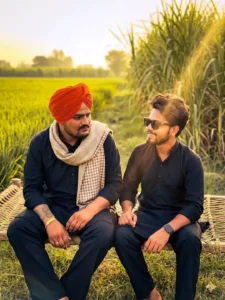
Tow person upload reference image
Keep my face exactly the same tow as the uploaded photo. Do not change or edit my face. 100% Create an ultra-realistic cinematic portrait scene set in rural Punjab.

SCENE & STORY:
Location: Open Punjab farmland
Two traditional charpai (woven rope beds) placed in the fields Sidhu Moose Wala and one young Punjabi fan sitting relaxed on the bunk bed Calm, peaceful village morning mood Desi lifestyle, no city elements

CHARACTERS:
1) Sidhu Moose Wala (realistic, respectful portrayal)
Sitting comfortably on charpai Relaxed posture, confident and calm expression
Looking slightly toward the fields or talking with the fan
2) One young man fan Sitting beside Sidhu Moose Wala on the same or nearby charpai Happy, respectful, natural expression Village body language

OUTFIT:
SIDHU MOOSE WALA:
black Traditional Punjabi kurta pajama Orange turban Simple pagg (turban) OR open hair (natural) Desi jutti or shoes Minimal a
Keep face 100% original and unchanged.
No face reshaping, no beauty filter, no Al facial modification.
Preserve real skin texture, facial features, expression, and identity exactly as original.
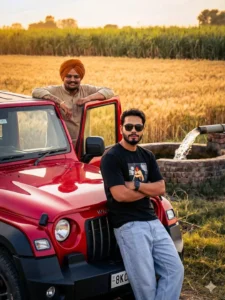
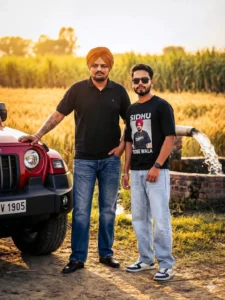
"Ultra-realistic photo of Sidhu Moose Wala and a young fan leaning casually on a red Jeep in Punjab countryside. Same fan outfit: black photo T-shirt, light blue loose jeans, black luxury sunglasses, Apple black smartwatch. Wheat + sugarcane fields, village well with flowing water in background.
Pose: Sidhu Moose Wala leaning on Jeep door, fan leaning on bonnet with crossed arms. Lighting: Soft golden hour rim light.Camera: DSLR cinematic framing, crisp focus. Quality: 8K realism, no Al look. Aspect Ratio: 3:4 Negative Prompt: over-smooth skin, blur, extra fingers, fake lighting" Acpact ratio 3:4
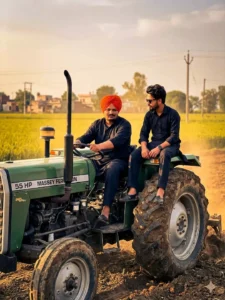
Tow person upload reference Image
Keep my face exactly the same tow as the uploaded photo. Do not change or edit my face. 100% Keep my face exactly the same as the uploaded photo. Do not change or edit my face. 100% Create an ultra-realistic cinematic rural Punjab scene.

SCENE & STORY:

Location: Punjab countryside, open green fields Freshly plowed farmland (zameen jot rahi ho) Early morning or late afternoon rural daylight Calm village atmosphere, birds flying, dust in air

CHARACTERS:

1) Punjabi singer Sidhu Moose Wala (realistic look, respectful, alive portrayal) Sitting on a Massey Ferguson tractor Driving the tractor confidently Focused, calm expression Hands on steering wheel

2) One young Punjabi fan Sitting side seat the tractor (front mudguard or small trolley attached)
Relaxed, happy expression Looking at Sidhu Moose Wala with respect Village lifestyle body language
TRACTOR DETAILS: Massey Ferguson tractor Green color
55 Η
Keep face 100% original and unchanged.
No face reshaping, no beauty filter, no Al facial modification. Preserve real skin texture, facial features, expression, and identity exactly as original.
"Create an ultra-realistic cinematic photograph featuring Sidhu Moose Wala standing confidently beside a young male fan in a rural Punjab setting.

SUBJECTS & IDENTITY:
Sidhu Moose Wala: tall, strong Punjabi presence, signature confident attitude, beard, turban/casual Punjabi hairstyle, calm but powerful expression Fan: young Indian male, stylish, confident fan-boy vibe, standing slightly angled toward Sidhu Moose Wala

OUTFIT DETAILS (FAN):
Black printed photo T-shirt (Sidhu Moose Wala photo style print) Light blue loose-fit jeans Black luxury sunglasses (premium glossy frame) Apple Smart Watch (black strap) Clean sneakers or casual shoes

OUTFIT DETAILS (SIDHU MOOSE WALA): Signature Punjabi casual outfit (kurta or tee + jeans) Traditional yet modern look
Minimal accessories, natural rugged style
Keep face 100% of il unchanged.
No face reshaping, no beauty filter, no Al facial modification.
Preserve real skin texture, facial features, expression, and identity exactly as original.
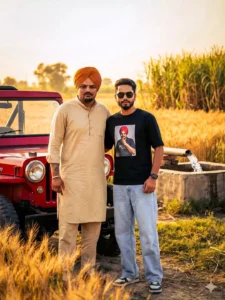
"Ultra-realistic cinematic photo of Sidhu Moose Wala standing confidently with a young male fan beside a red Jeep in rural Punjab. Fan wearing black Sidhu Moose Wala photo T-shirt, light blue loose jeans, black luxury sunglasses, Apple black smartwatch.
Background shows wheat fields, sugarcane fields, village well with flowing water.
Pose: Both standing shoulder-to-shoulder, chest open, hands relaxed, hero stance.
Lighting: Golden hour, warm cinematic sunlight.
Camera: DSLR look, 85mm lens feel, shallow depth of field.
Quality: 8K, hyper-realistic, natural skin texture.
Aspect Ratio: 3:4 Negative Prompt: cartoon, fake skin, blur, distortion, Al artifacts") Acpact ratio 3:4
How To Create Image Sidhu Moosewala Ai Photo Prompts
Friends, if you don’t know how to use Google Gemini or are facing any problems, please read this paragraph. Using Gemini is easy. First, you need to copy the prompt provided above. Then, click on the “Create Your Image” button to go to the Google Gemini website. Now, log in there and then paste the prompt you copied. After that, you need to add two images: one of Sidhu Moosewala and one of yourself. So, add your photo and Sidhu Moosewala’s photo using the plus icon. Then, click on the send button. In a few moments, Gemini will create an image of you with Sidhu Moosewala, which will look completely realistic.
Final Words
This way, you too can now transform your normal image into one with Sidhu Moosewala, and I’ve already explained the process. I hope you’ll like this photo editing technique. If you want more trending and realistic photo prompts for AI photo editing, visit this website regularly; you’ll find prompts for trending photos. You can also share this article if you like.
