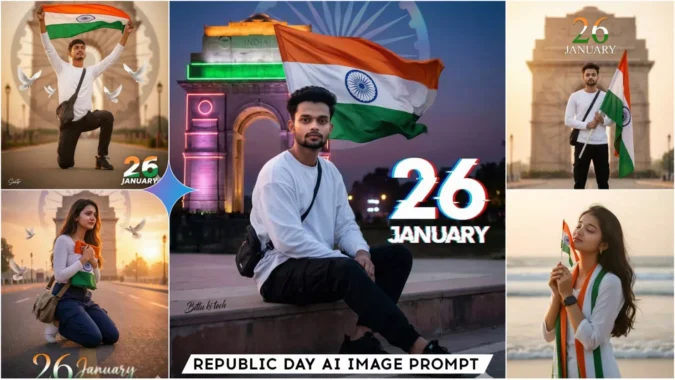
Republic Day Ai Photo Editing Prompts – Friends, if you want to go viral on social media, and if you want to gain followers by posting unique content, then you’ll have to do different types of editing. This includes photo editing, reel editing, and other unique types of editing. And if you choose AI photo editing for your photo editing needs, because that’s what’s trending and going viral right now, then you’ll find the best Google Gemini prompts right here on this website. In this article, I’m giving you some new, unique trending prompts for Google Gemini that will help you create realistic AI images. This type of image is currently going viral, so I thought I’d provide you with the prompts. So today I’m giving you some new, unique trending prompts that will help you do unique, realistic editing. Just keep reading the article, and you’ll understand everything.
Details Of Republic Day Ai Photo Editing Prompts
Friends, today I’m going to give you some prompts for 26th January photo editing. As you know, every year on January 26th, Republic Day is celebrated throughout India. On this day, people hoist the national flag everywhere, sing the national anthem, and remember and pay homage to the martyrs who sacrificed their lives for the country’s independence. Now, in this modern age, people are creating and sharing AI-generated photos of themselves holding the tricolor flag and celebrating Republic Day. In this article, I’m giving you some selected prompts that you can use to create your own images. You will see example images in the article, and with the help of these prompts, you can create similar images. The process of creating them is also easy; we will be using Gemini, and I will explain the process in the following paragraphs.
How To Generate Photos Using These Prompts
Look, creating Republic Day images with Gemini is very easy. I’ll explain all the simple steps so you can easily create the images. Copy one of the prompts and go to the official Gemini website. If you can’t find it, you can use the “Create Your Image” button. Now, before pasting the prompt, you need to log in, and then paste the prompt. Remember to select the Pro or Thinking mode. Then, add one of your own images using the plus icon. This will ensure your AI image includes your own image and looks realistic. Now, click on the send button and wait a few moments. Gemini will create a realistic AI image of Republic Day. It won’t even look like it was created by AI. By repeating this process with different prompts, you can create many different images.
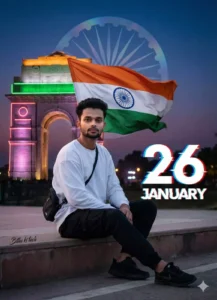
Ultra-realistic modern patriotic portrait of the uploaded Indian boy sitting casually on a concrete step, holding the Indian tricolor flag behind him flowing in the wind. White oversized long-sleeve T-shirt, black cargo pants, black sneakers, sling bag. India Gate neon-lit in the background, Ashoka Chakra as a subtle holographic overlay, cinematic dusk lighting, shallow depth of field, crisp 8K DSLR quality. Bold graphic 26 in tricolor, “JANUARY” with glitch-blur typography. Small “editzprompt” signature in left corner.
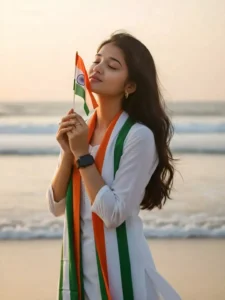
"A serene patriotic scene of a young Indian woman standing on a beach. Soft golden sunlight behind her creating a gentle warm glow and silhouette effect. She is holding a small Indian tricolor flag close to her face with both hands, eyes closed, expressing peace and respect. She has long wavy hair, natural makeup, and is wearing a simple white kurti with a tricolor (orange-white-green) stole draped around her neck. A black smartwatch on her wrist, minimal jewelry, soft breeze moving her hair slightly. Background shows calm ocean waves, soft bokeh, pastel sky colors, ultra-realistic 8K DSLR quality, smooth skin texture, warm tones, cinematic composition. Use same to same face as given reference pic.'
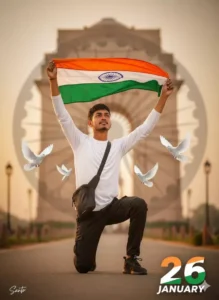
Ultra-realistic patriotic portrait of uploaded Indian boy crouching on one knee, holding the Indian tricolor flag. White long-sleeve T-shirt, black cargo, black sneakers, sling bag. India Gate and faded Ashoka Chakra in soft background, flying doves, warm golden-hour cinematic lighting, shallow depth of field, 8K DSLR quality. A small Santo signature in left corner, and large 26 number with three indian flag colour, 'JANUARY' in bottom with stylish font and blur.
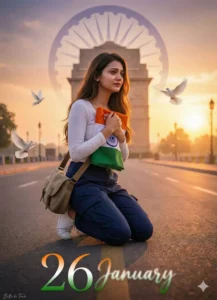
Ultra-realistic emotional patriotic portrait of the uploaded Indian woman kneeling on one knee, gently holding the Indian tricolor flag close to her chest. Outfit: white long-sleeve top, navy blue cargo pants, sneakers, sling bag. India Gate in the distance with a faded Ashoka Chakra blended into the sky. Soft sunrise golden light, warm tones, cinematic haze, shallow depth of field, realistic skin pores, 8K DSLR quality. White doves flying slowly. Subtle film grain. Small “Bittu ki Tech” signature on the left. Large elegant “26” in saffron-white-green gradient, “JANUARY” at the bottom in handwritten-style font with light blur.
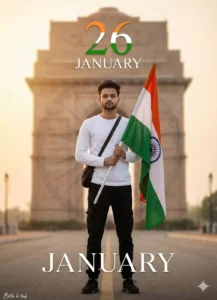
Ultra-realistic minimal patriotic portrait of the uploaded Indian boy standing calmly, holding the Indian tricolor flag vertically. Clean white long-sleeve T-shirt, black cargo pants, black sneakers, sling bag. Softly blurred India Gate background, very subtle Ashoka Chakra texture, warm cinematic lighting, shallow depth of field, 8K DSLR clarity. Elegant tricolor 26, “JANUARY” in thin premium serif font with soft blur. Small “editzprompt” signature in left corner.
Why Should We Use Google Gemini?
We should use Gemini because it gives us the best results. There are no flaws in the images created with Gemini. Nowadays, most people use Gemini for image editing. It easily performs whatever task you want it to do. If you want to change the background of a normal image, add something to it, or restore an old photo, Gemini does it in a completely natural way that looks realistic. You can also generate videos with it, but I’ll explain that later. Right now, we’re learning to create images, so we should focus on that.
Conclusion
This is how you can create AI images for Republic Day featuring your own face. Republic Day is still some time away, so if you share these images now, they’re likely to go viral. People will ask you how you did it, and it will help you grow on social media. I hope you like these prompts and that you’ve learned the techniques I’ve taught. I teach how to create new trending AI images, so keep visiting this website.
