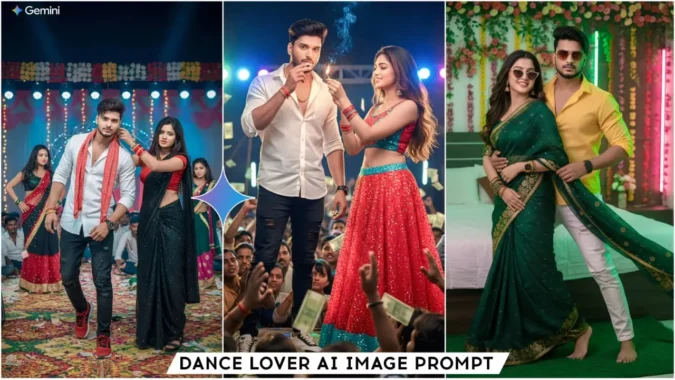
Orchestra Lover Ai Photo Editing Prompts Google Gemini – Hello friends, welcome to this article today. Today I will teach you a very special editing technique which is AI photo editing. I am saying this with confidence that you would not have tried this type of editing before. Because this editing has just become a trend and you are definitely going to like it. If you are from UP or outside Jharkhand, then you will enjoy watching this editing and you will definitely make your image like this. So friends, we will do this AI photo editing with the help of Google Gemini. Follow this article and complete your video editing as I explain.
Details Of Orchestra Lover Ai Photo Editing Prompts Google Gemini
Speaking of AI image editing, this editing tool provides prompts to create images in different styles, but they’re all similar, with varying styles. In some images, you’ll be seen dancing on stage with female dancers, while others show you dancing on stage while your girlfriend or wife is dragging you away by the ears, seemingly angry. Another shows you dancing with your girlfriend. You can create these types of images with the help of this article. Friends, orchestras are very popular in Bihar, and wedding season is currently underway. If you want to create an image of yourself dancing in an orchestra, you should definitely try this. It will create a completely realistic image using the prompts I’ll provide. All these prompts will create images as described. You can create any image using them. Let us know how we are going to make these.
Why We will Edit With Gemini
So friends, we can create this AI dance image using Gemini. If we want a realistic image, we’ll need to use Gemini. You can use chat.gpt, but your face won’t match, and your image won’t look realistic. However, Gemini produces much better images. I’m telling you this based on my experience. We can create unlimited AI images in Gemini, just enter a prompt. And don’t worry about prompts; you’ll find thousands of prompts on our website. You can copy the prompt of any image you like and create your own. So, let me give you some images below along with their prompts. Copy the prompt of the image you like and then create your own image in Gemini using the Create Your Image button. If you don’t know how to use Gemini, first read the paragraph on “How to Use Images” and then create your own image.
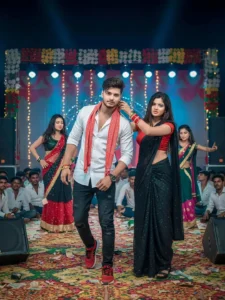
Ultra-realistic cinematic portrait of a young and fit stylish man. he has his exact face and hairstyle perfectly matching the uploaded reference image, he wears a white formal shirt with the top buttons open, black jeans and black sport shoes. He has a red gamcha hanging around his neck. he also wears a luxury wristwatch. He has gone to an orchestra. He is on the decorated stage with mats and disco lights. Near him, three beautiful girls are dancing to the steps of a Bhojpuri song. They are wearing different colour lehengas. He is accompanied by his beautiful wife (outfit:black glitter saree, red blouse). She is angrily holding the ear of the man with one of her hands and taking him towards the stage. The man is looking straight at the camera. There is a huge crowd of adult men below the stage. It is night time, there are two speakers on both the sides. His skin is naturally fair, youthful, and glows with disco lights. Create cinematic and hyper-realistic photos without face morphing.
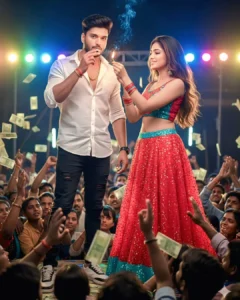
Ultra-realistic 8K HD cinematic portrait of a fit stylish man. he has his exact face and hairstyle perfectly matching the uploaded reference image, hairstyle impeccably styled, Man wears a sleeve fold white shirt, black distressed jeans and a black sport shoes. He wears a luxury watch and a gold chain around his neck. he is standing on the stage with a beautiful girl. The girl is wearing a glitter red colour lehenga,glitter red blouse. There is a huge crowd of men below the stage, The man is standing on the stage, He has a beedi in his mouth which he is holding with his hand and The girl is holding a burning matchstick, Some smoke is coming out of the beedi. The man is looking towards the camera in a stylish pose and the girl is looking towards the man's face with a sweet smile. It is night time and colourful lights are burning all around the stage due to which the faces of both the people standing on the stage are shining and glowing create a realistic photo with 100% face match.
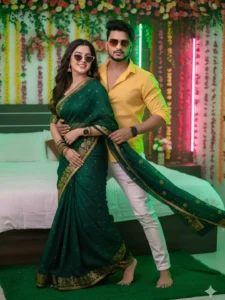
Ultra-realistic 8K cinematic portrait of a young and fit s man whose height is 5.10 ft. he has his exact face and hairstyle perfectly matching the uploaded reference image, Man wears a transparent yellow shirt with top buttons open and a white jeans, he is barefoot. he wears a rectangular sunglass, a wrsiwatch. he is in his room with his 24-year-old beautiful wife. she is wearing a glitter green saree with a golden floral border and a golden watch with bangles. She is barefoot. The man is standing behind his wife And with his both hands he is holding his wife's waist and pulling her towards himself. he is looking straight towards the camera. The wife is holding his both hand romantically She is looking at the man and giving a sweet smile. One of his wife's feet is on the bed and the other is on the floor. The walls of the room are decorated with garlands of different flowers and pink and yellow neon lights. Create a cinematic, hyper-realistic photo without any morphing and 100% match
How To Use Orchestra Lover Ai Photo Editing Prompts Google Gemini
There is a simple process for using the prompt in Google Gemini. I am telling you here, read it and I will also tell you how you can get a 100% match with your face. Look, after copying the prompt, first of all we have to come to the Gemini website by clicking on the Create Your Image button. Now we have to login here. After that we have to paste the prompt and click on the + icon and add an image from there. Friends, your face should be clear in your image, only then your face will match.
Now to match the face, add this sentence in the prompt that my face should be exactly the same and real. Now you click on the send button and wait for a few moments. Now Gemini will create an image for us which we could not even imagine that our image could be created like this, that too automatically. On seeing it, it will not be clear whether it is the original or an image created by me ai.
Conclusion
By doing this, you can create these AI images. You’ll definitely get excellent results. Everyone will be surprised by your image editing skills. I’ll keep you posted on trending prompts like this. Keep visiting our website. If you liked this article, don’t forget to share it.
