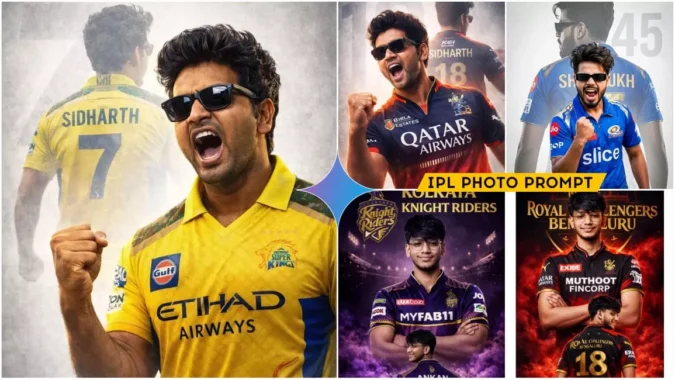
IPL Ai Photo Editing Prompts – Friends, as you all know, the 2026 IPL season is just about to begin. Since every cricket enthusiast eagerly awaits the IPL, everyone is currently engaging in AI photo editing for the tournament—specifically, creating AI-generated images of themselves supporting their favorite teams. In these edits, they appear wearing their team’s jersey, with their photos styled according to that team’s specific theme. Therefore, friends, if you too wish to show your support for your team and want to create an AI-edited IPL photo featuring your own image—one where your face blends in perfectly—then in this article today, I am providing you with some trending photo prompts. These prompts will allow you to generate images for various different IPL teams. So, stay tuned to this article to get your hands on these prompts!
Details Of IPL Ai Photo Editing Prompts
In this editing showcase, you will encounter a variety of AI-generated photo edits. You will see that photos featuring various IPL teams have been edited—specifically, our own images have been seamlessly integrated, with our faces perfectly matched to the visuals. Whether it’s CSK in one photo or MI in another, you will get to see AI-generated images representing a range of different teams. You will observe that these photos feature us wearing our respective team jerseys, set against a stadium backdrop where the team’s name is displayed in large lettering. We can create these specific photos with the help of prompts, utilizing tools such as Google Gemini, ChatGPT, or any other AI platform. I am going to walk you through the entire process in this article, so please read it carefully.
What exactly will you need to perform this photo edit?
Friends, Since this involves AI-based photo editing, we won’t require many resources—we are going to accomplish this in just two simple steps. First, you need to get a selfie or a clear image of yourself ready—one in which your face is clearly visible. The second thing we need is a “prompt,” which we will use to generate the photo. In this article, I have provided you with prompts tailored for creating photo edits for various IPL teams. Now, to generate an image using Gemini by copying one of these prompts, please proceed to read the next paragraph. In it, I will walk you through the steps required to generate the photo within Gemini.
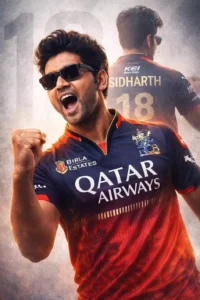
A high-quality sports poster featuring a slim-fit stylish handsome young Indian man (reference- uploaded photo) with quiff-style tousled mid-length black hair, Rectangular black sunglasses. He is wearing a Royal Challengers Bangalore (RCB) cricket jersey in navy blue and red, with official RCB branding and sponsor logos (use uploaded jersey). The image uses a double exposure effect: in the foreground, he is shouting in a triumphant celebration with a clenched fist; in the background, a larger, faded silhouette of him shows his back, displaying the name ‘SIDHARTH’ and the number ‘18’ in metallic gold. The background is a clean, textured light gray with a large, subtle number ‘18’ watermark. Cinematic lighting, sharp focus, 8k resolution, professional graphic design style.
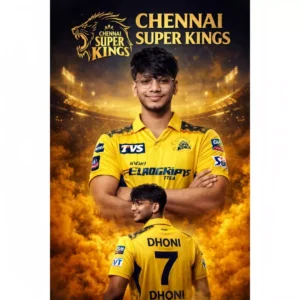
Create a dramatic ultra-realistic IPL-style poster using my photo. Keep my facial features exactly the same. Dress me in a Chennai Super Kings (CSK) inspired yellow jersey with navy blue accents and white sponsor logos on chest and sleeves. Create two versions: a center chest-up portrait with arms crossed and confident smile, and a lower back-body pose wearing a yellow jersey with navy blue "7 DHONI" on the back and army print on both shoulders, smiling and surrounded
Keep Face must remain exactly same as reference Image, no face change, no reshaping, no beautification
Acpact ratio 3;4
JKH
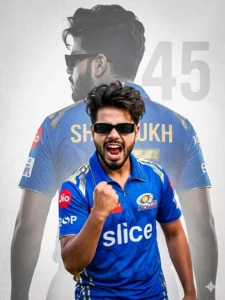
A high-quality sports poster featuring a young boy with quiff-style, tousled mid-length black hair and a light mustache, wearing rectangular black sunglasses. He is dressed in a Mumbai Indians (MI) cricket jersey in iconic royal blue and gold, with official MI branding and sponsor logos. The design uses a powerful double exposure effect: in the foreground, he is captured mid-shout in an intense, triumphant celebration with a clenched fist; in the background, a larger, faded silhouette of him is shown from behind, displaying the name "Shahrukh" and the jersey number "45". The background is a clean, textured light gray with a large, subtle "45" watermark. Cinematic lighting, dramatic contrast, sharp focus, ultra-detailed 8K resolution, professional sports poster graphic design style. Enable stric
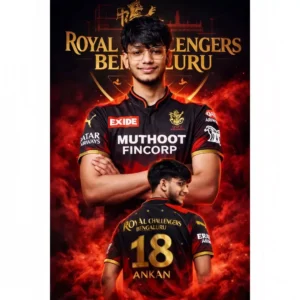
Create a dramatic IPL-style poster using my photo. Keep my facial features exactly the same as in my photo but put me in a RCB style jersey, in 2026 style, with sponsor logos in white on the chest and sleeves. Make two versions of me: one large portrait from the chest up with arms crossed and a confident smile in the center, and one back-body image of me below wearing a ROYAL CHALLENGER BENGALURU with golden colour 18 ANKAN in back smiling, surrounded by red smoke at the bottom. Use a dark black background with a large RCB logo in text golden 'ROYAL CHALLENGER BENGALURU' stadium silhouette behind me, similar to a cricket team emblem. Use vivid, high-contrast lighting to make my face and jersey stand out. Make the overall style sharp, colorful and suitable for a sports poster
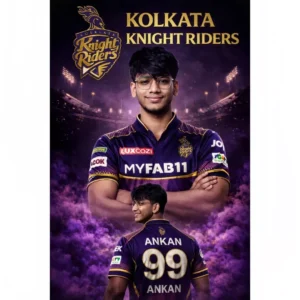
Create a dramatic IPL-style poster using my photo. Keep my facial features exactly the same as in my photo but put me in a kolkata knight riders style jersey, in 2025 style, with sponsor logos in white on the chest and sleeves. Make two versions of me: one large portrait from the chest up with arms crossed and a confident smile in the center, and one back-body image of me below wearing a kolkata knight riders jersey with white colour 99 ANKAN in back smiling,surrounded by purple smoke at the bottom. Use a dark black background with a large kolkata knight riders logo in text golden kolkata knight riders stadium silhouette behind me, similar to a cricket team emblem. Use vivid, high-contrast lighting to make my face and jersey stand out. Make the overall style sharp, colorful and suitable for a sports poster
How To Generate Image Using Prompt
Friends, to perform this photo editing, we will need an AI tool to generate our AI image; for this purpose, you can use either Google Gemini or ChatGPT. The process is identical for both, and the results obtained will also be the same. I will now guide you through the steps using Gemini. First, copy the prompt, then click on the “Create Your Image” button; this will redirect you to the Gemini website. Now, paste the prompt into the designated area, add a photo of yourself, and then click the “Generate” button. Within just a few moments, your AI image will be ready, featuring your face seamlessly integrated into the composition.
CONCLUSION
In this way, you too can now effortlessly create AI-edited photos featuring your favorite IPL team. You won’t encounter any difficulties while performing this editing, and since it is currently trending, the chances of your photos going viral will also increase. I hope you enjoyed this article and were able to understand all the information provided.
