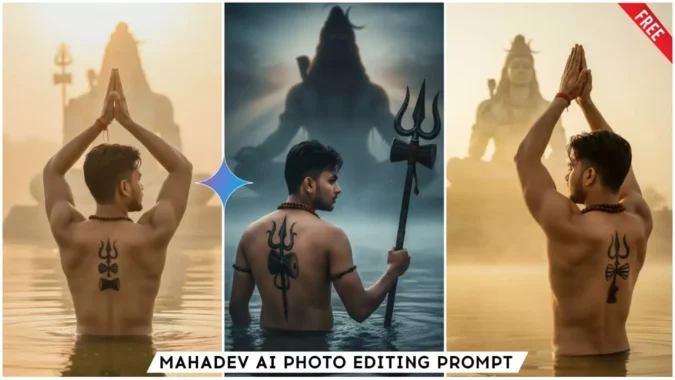
Google Gemini Mahadev Ai Photo Editing Prompts – Hello friends, how are you? Today I will teach you how to create a woolen image with Mahadev. These images are going viral right now, and you can also create your own image like this. So, if you want to create an image of yourself sitting in front of Mahadev, praying with folded hands, and a statue of Lord Shiva in front of you, then follow this article. I will give you complete information about it in detail. Read this article and create your devotional image with the help of prompts. This entire process is absolutely free.
Details Of Google Gemini Mahadev Ai Photo Editing Prompts
Friends, as I have already told you that this is really an editing to show devotion, in this we will be seen bowing down in front of our God. Let me tell you in detail, listen. Look, in this editing we will be seen worshipping Lord Shiva, we will stand in front of him or near him and pray to him with folded hands or we will have a trident in our hand and there will be a big idol of Lord Shiva with a big trident in his hand. The environment will be completely cold and cold wave like in Kedarnath. And we will stand in water, half of our body will be submerged in water till the waist. There will be a tattoo of Lord Shiva on our body. Or a tattoo on the back. In such an environment, the photo will be taken, it will look absolutely realistic.
Why Should We Do This Editing?
Look, in this age of AI, anyone can easily create any kind of editing, and people even create different types of trending images. But if we belong to the Hindu community, we should also make people aware of our identity and our religious beliefs through editing. If we use AI correctly and create such devotional images and share them, all our followers and those who see them will realize that they should also create such images. And devotion will arise in their hearts too. Because of you, more people will also develop devotional feelings, which will earn you merit. Friends, we must follow modern trends, but at the same time, we must maintain our traditional traditions. We can maintain our traditions and devotion even in this new era. Therefore, we must definitely do this editing.
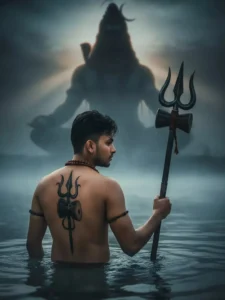
Ultra-detailed 8K dark-cinematic hyper-realistic style. Back-profile of a young Indian man standing waist-deep in the Ganges river during early dawn. Wet skin with high-contrast highlights. A bold, detailed black Trishul and Damru tattoo spans across his back. He wears a Rudraksha mala, gripping a heavy antique metal Trishul in his right hand.

The atmosphere is darker and more dramatic, with dense mist drifting over the river. A colossal, shadow-lit divine silhouette of Lord Shiva appears meditating in the background, emerging through the fog with subtle glowing energy, powerful yet realistic.

Hard-edge volumetric rays, deep shadows, dramatic contrast, cinematic composition, moody color tones, razor-sharp textures, natural water movement, spiritual intensity, photorealistic realism without any fantasy-art or paint effect.
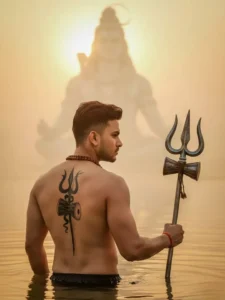
A hyper-realistic, cinematic back-profile shot of a muscular young Indian man standing waist-deep in the holy Ganges river at sunrise. He is shirtless with wet skin and has a large, detailed black tattoo of a Trishul (Trident) and Damru on his back. He is wearing a Rudraksha mala around his neck and holding a real, antique metal Trishul in his right hand. In the misty, golden background, a giant, ethereal, and divine vision of Lord Shiva is meditating. Soft volumetric sun rays piercing through the fog, spiritual atmosphere, 8k resolution, highly detailed, photorealistic."
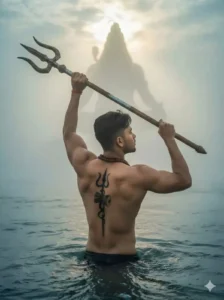
Ultra-detailed 8K dramatic cinematic realism. Side-profile shot of a muscular young Indian man standing waist-deep in a sacred river during early dawn. The man is in a powerful spiritual pose: both arms lifted diagonally upward as he holds a large antique metal Trishul above his head with both hands, pointing it toward the sky as if offering it to the divine. His wet skin shows intense highlights and shadows, revealing a sharply defined back.

A bold black Trishul and Damru tattoo runs along his spine. A Rudraksha mala rests on his chest. The river is filled with dense morning fog, creating a dramatic, mystical atmosphere.

Far in the background, through the heavy mist, the faint majestic silhouette of Lord Shiva in deep meditation appears-subtle, divine, and colossal. Strong Tyndall light rays cut through the fog, casting a holy glow around the scene. Moody tones, high-contrast lighting, extremely sharp textures, realistic water movement, and pure photorealistic spiritual
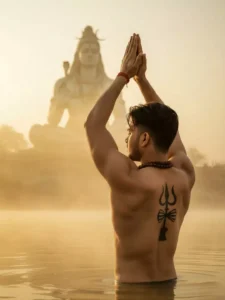
A hyper-realistic, cinematic side-profile shot of a muscular young Indian man standing waist-deep in a holy river at sunrise. The man is facing away, looking towards the horizon with his hands raised high above his head in a prayer gesture (Anjali Mudra). He is shirtless with wet skin, showcasing a defined back. On his spine, there is a prominent black tattoo of a Trishul (Trident) with a Damru. He wears a Rudraksha bead necklace. In the background, amidst the golden mist and soft morning sun rays, a faint, majestic, ethereal statue of Lord Shiva sitting in meditation is visible. The atmosphere is divine, spiritual, and serene. 8k resolution, highly detailed, photorealistic lighting, Tyndall effect."
How To Create With Google Gemini Mahadev Ai Photo Editing Prompts
So guys, we’re going to create this editing with Google Gemini, and we need to know how to use Gemini because without knowledge, we can’t make images truly realistic. Since I’m asking you to help, I’ll also show you how to use it. Copy the prompt from the image you like in the article. Our image will be created using these prompts. After copying, click the red button. You’ll be taken to the Gemini website. Log in, which is simple. Paste the prompt and add a photo of yourself using the + icon on the dashboard. Your face should be clear in the image. Click the “Send” button and wait a moment. Google Gemini will create an attractive and unique image for you. It will be exactly like the example images I provided in the article.
Final Word
Friends, final words, I’m giving you a pro tip: When adding your own image, make sure there are no other faces in it. This means you shouldn’t use a selfie you took with someone else. Always add a single-faced image. And don’t add too much of your face. This way, you can create a realistic image. I hope you’ll like it.
