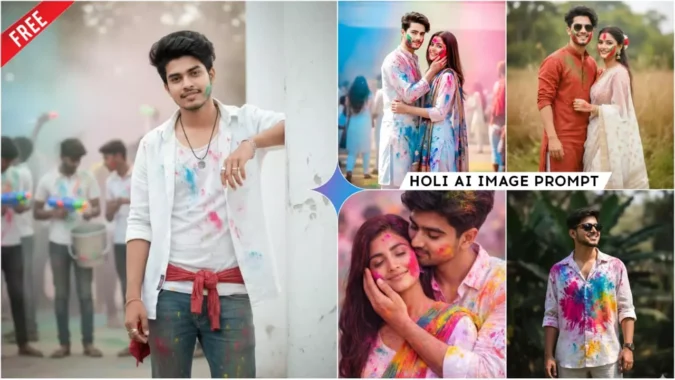
Google Gemini Holi Ai Photo Editing Prompts – How are you, friends? Welcome to this article. Today, I will teach you how to create AI-generated photos for Holi. As we all know, the year 2026 has arrived, and like every year, people have started preparing to celebrate the festival of Holi. Those who share photos on social media have now started creating images using AI and are making realistic Holi-themed pictures. So, we also have the opportunity to create Holi images first and share them, which will give us a chance to go viral. For this Holi image editing, we can use two tools: Gemini and ChatGPT. We can create AI images with the help of both. So, let me teach you how to create images using Gemini. Read the article.
Details Of Google Gemini Holi Ai Photo Editing Prompts
First, let’s learn about this editing process, how it works, and its special features. In this editing style, we’ll see images in different styles. In some images, we’ll see people celebrating the Holi festival, with colors on their clothes and faces. The atmosphere will be festive, reflecting the spirit of Holi. In other images, we’ll see couples celebrating Holi together, or perhaps one partner holding the other in their arms. Both will have colors on their faces and clothes. Friends, these images won’t look like they were created with AI at all. The atmosphere in the images will be just like a real Holi celebration. The best part is that these images are attractive and people love them. With the help of AI, we don’t need any special skills; the images will be ready in just a few minutes.
How To Select Your Image
Look, if we want to create realistic and perfect face-matched images, there are some tips we should follow. Whether you want to create any type of image and give your face a realistic look, you should add your own image along with the prompt. You need to add a clear image of your face, one that doesn’t include anyone else’s face besides your own. Because having multiple faces can cause Gemini to misinterpret the image, you should always add either a selfie or a clear image of your face. This will give us better results.
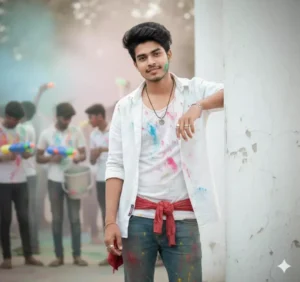
Make this photo (according to the uploaded image) without changing the face without glasses with a calm face, wearing a short white luxury shirt open, and a white t-shirt, and blue levis pants with a red scarf tied around the waist. The shirt and pants are very dirty from color full holi powder ,standing looking at someone,and seen behind there are also many people

Create a 8k hyper-realistic dark green portrait cinematic image with dramatic smile actions .(uploaded photo 100% face match)"A 5.10feet young man with dark normal hair and a subtle beard, wearing a unique oversized white shirt on various colorful Holi splash on silk shirt, cream-colored pants, and black sunglass stands outdoors in a leafy green natural setting. He looks intently to the right. Bohemian, summer fashion. --ar 5:6 --style raw --v 5.2
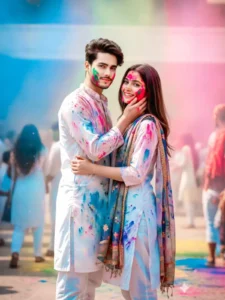
Holi Couples prompt celebrating Holi, the festival of colors. The man is embracing the woman from behind, with his hand gently touching her face, which is smeared with pink and red Holi powder. Both are dressed in white outfits that are also stained with colorful powders. The woman has a colorful dupatta draped over her shoulder, adding to the festive look. Her eyes are closed, and she has a gentle smile, while the man is looking front at her with affection.
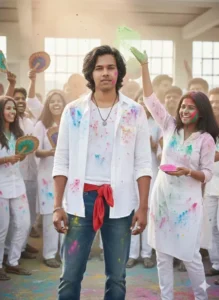
Make this photo (according to the uploaded image) without changing the face without glasses with a calm face, wearing a short white luxury shirt open, and a white t-shirt, and blue levis pants with a red scarf tied around the waist. The shirt and pants are very dirty from colorful holi powder, standing looking at someone, and seen behind there are also many people dressed similarly carrying Indian-style flies,the air is also seen filled with colorful holi powder.
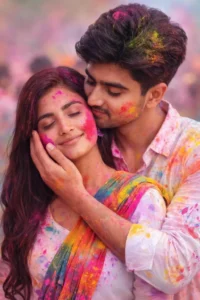
A romantic and vibrant image capturing a young couple celebrating Holi, the festival of colors. The man is embracing the woman from behind, with his hand gently touching her face, which is smeared with pink and red Holi powder. Both are dressed in white outfits that are also stained with colorful powders. The woman has a colorful dupatta draped over her shoulder, adding to the festive look. Her eyes are closed, and she has a gentle smile, while the man is looking down at her with affection.
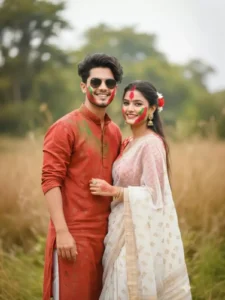
"A joyful young couple celebrating Holi festival, both smiling brightly at the camera. The woman is wearing a beautiful white and gold patterned saree with a red, patterned blouse, and has vibrant red and green gulal (powdered colors) playfully smeared on her face. She has a red and white flower in her dark hair, elegant earrings, bangles, and a decorative ring on her finger, with red floral designs on her hands. The man is dressed in festive traditional attire and also has colorful gulal on his
How To Create Image With Google Gemini Holi Ai Photo Editing Prompts
Look, we’re going to do this trending photo editing with Google Gemini, and you know that Google is the most popular tool in the world these days. When it comes to photo editing, it’s used to create realistic and trending images. So in this paragraph I will tell you the process of using Gemini. Follow it step by step and you will understand. Look, first of all we have to do is we are going to need a prompt, so I have already given you the prompt in this article. You can copy any prompt, after that you can go to the official website by clicking on the Create Your Image button below. Here we are going to create our image,
so first of all you have to login here and after logging in, paste the prompt. You will also see a plus option in the dashboard. Click on it and add a real image of yours so that our face matches the image that is going to be created. So we will add a realistic image of ours through our plus icon in which our clear face is visible. After that, we have to click on the send button and wait for a moment, till then Gemini will create our image and when it does not create a realistic image for us, your image will be created in the same way as you have just seen the image in this article.
Conclusion
So in this way you can create a realistic image of yours which will be made with the help of Germany and this whole process is absolutely free and it will not take much time for you and your professional image will also be ready. If you want to go viral on social media and want to grow, then you should try such new trending images, these are becoming very viral these days, people who are creating and sharing them are also increasing their followers, so you should definitely try them once and all the prompts you need to create new trending images are available on our website, you just have to copy from here and paste it in Germany and create your image, I hope so.
