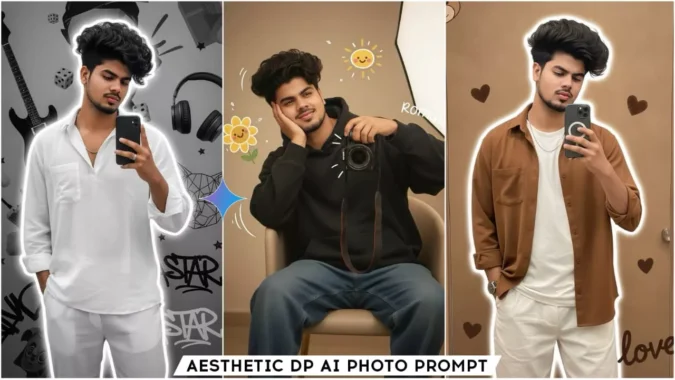
Google Gemini Boys Aesthetic Dp Ai Photo Editing Prompts – Hello friends, how are you? I hope you’re all well and healthy. So, in today’s article, I’m going to teach you another new training in AI photo editing. This one is specifically designed for boys. Girls can also use it. Girls will need to make some customizations to the prompt provided to create their photo. However, if you’re a boy and want to edit your photo as your WhatsApp DP or your DP profile picture on any social media platform, you can use this trending static AI photo editing technique. Those who like to click aesthetic photos or appreciate aesthetic images will definitely find this article helpful. Friends, these images are currently going viral, and you should definitely follow the trend and create them. It won’t look like they’re created with AI or are real images.
Details Of Google Gemini Boys Aesthetic Dp Ai Photo Editing Prompts
Talking about the details of this editing, we can create our images in different styles. For example, we’re taking a mirror selfie. We’re holding a black iPhone 16 Pro Max. We’re holding the phone with one hand in our pants pocket and the other, and our clothes are styled differently. In some images, we’re sitting on a chair and holding a small-lensed camera. Speaking of backgrounds, the aesthetics of backgrounds vary from photo to photo. Some will feature a heart shape, some a guitar, some a sunflower printed wall.
Our bodies have a bright outline. These are brief examples I’ve given you. You can create your own image and check it. We’re creating it in Gemini, so please read the process for using Gemini; I’ll explain it in the next paragraph. Read it, copy any prompt, and use it to create your own aesthetic DP in Gemini. You’ll get better results.
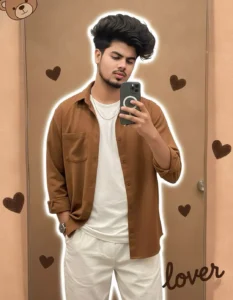
"A youngboy realistic face taking a mirror selfie, wearing a coffee loose shirt and white pants, holding the shirt casually with one hand, minimal jewelry, same hair, realistic lighting, and soft white outline glow around him. The background is a warm, light brown aesthetic featuring cute, illustrated elements: a peek-a-boo teddy bear face in the top left, multiple textured dark brown heart shapes scattered throughout, and the word "lover" written in a flowing script across the bottom right.
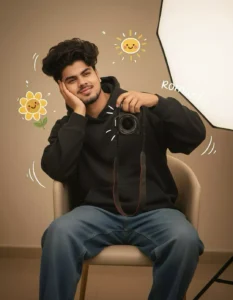
Aesthetic cozy mirror selfie of a young 20 year boy sitting casually on a chair, wearing a dark oversized hoodie and blue baggy jeans, holding a professional camera in one hand, resting her face in the other hand with a soft dreamy smile. Warm beige indoo background with soft studio lighting, minimal modern interior. Cute cartoon-style doodles around her including a smiling sunflower character and hand-drawn yellow sun, playful white sketch lines around the camera. Handwritten romantic and don't change the face
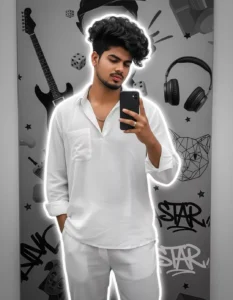
A, stylish young man taking a mirror selfie, wearing a white loose shirt and white pants, holding the shirt casually with one hand, minimal jewelry, curly hair, realistic lighting, and soft white outline glow around him. The background is a modern grayscale aesthetic collage with elements like electric guitar, headphones, dice, cat face decor, 3D stars, and "STAR" graffiti text. Artistic, trendy, Instagram-style edit with balanced composition and HD quality, same proportions as portrait photo
How To Use Google Gemini Boys Aesthetic Dp Ai Photo Editing Prompts
So friends, to create this trading image, we’ll need Google Gemini, and I’ll explain step-by-step how to use it in Google Gemini. I’ll explain step-by-step in this paragraph. You can complete your editing by reading it. So, friends, the first thing you need to do is copy the image you like from the prompts provided in this article. Then, you’ll see the “Create Your Image” button below. Click on it. This will open the official Google Gemini website, where we’ll generate our image. You can also download the Google Gemini application, available on the Play Store. You can install it directly from the play store.
After opening, what we will do now is paste this prompt which we have copied in the dashboard and you will see a plus icon in the bottom corner and by clicking on it we will add one of our images, either we can add a selfie or we can add an image with a clear face so that the email which we create after editing is absolutely realistic and with face match, now you will see the send button, you have to send it and wait for a few moments when our image will be ready and in a few moments our image will be ready, it will look absolutely realistic and professionally edited, you will like its result very much
Conclusion
So friends, this is how you can perform this trending aesthetic editing in Google Jan using prompts. This entire process is completely free and easy. You can complete this editing in just 1 to 2 minutes. If you need more such trending prompts for your image editing, keep visiting our website. Here, I’ll provide you with new trending photo editing prompts every day, using which you can create your own images. I hope you enjoyed this article. If you’d like, you can share it with all your friends.
