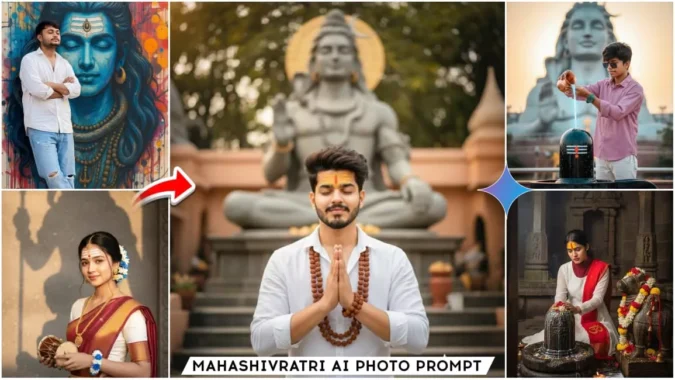
Gemini Mahashivratri Ai Photo Editing Prompts – Hello friends, welcome to our website. In today’s article, I’m going to share a tutorial on a trending of Mahashivratri ai photo editing. You may have seen this type of image on Instagram or other social media, or it’s becoming increasingly popular these days. Creating this type of image doesn’t require much effort. Using a simple prompt, you can easily create this realistic shivratri photo editing, which looks absolutely stunning. It’s been created manually. However, we’ll edit it in just one click using this tool. If you want to know how to do this ai photo editing, read this article. It explains the editing process in a very simple way, allowing you to easily edit your own.
Full Breakdown Of This Editing
Friends, this editing is based on the festival of Mahashivratri. As you all know, Mahashivratri falls in February 2026, and the festival is just a few days away. Devotees of Mahadev have already begun editing photos for Shivratri, creating images with Lord Shiva in various styles that look absolutely realistic, and no one will be able to tell they were created with an ai. Friends, you’ll notice that in some images, we’re offering water to Lord Shiva, in others, there’s a large painting of Lord Shiva on the wall, where we’re standing with our eyes closed, as if remembering the Lord. Another image features a photo of a girl worshipping Lord Shiva. You can now create your own face-on images for Shivratri using these different styles. These images are also going viral on social media.
Which AI Tool Is Used for Editing?
There are a variety of tools available for photo editing these days. You can easily create your own images for free using all of them. However, if we talk about which tool produces the most realistic and well-crafted images, it’s either Google Gemini or Chat GPT. You can use either. The image creation process in both is completely identical, and both create truly realistic images based on the prompts we provide. For today’s editing, we’ll use Gemini. Using Gemini offers numerous benefits. Our editing will be perfect and quite easy. Friends, I’m providing some images below, along with their prompts. You can copy any prompt you like and use it. I’ll also explain how to use Gemini in the next paragraph, and how you can use it to create your own image using Gemini.
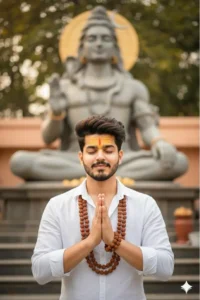
 An ultra-realistic 8K portrait of a stylish young man [retain the real face from the uploaded image].
A high-quality, realistic wide-angle shot of a young Indian man with thick, messy dark curly hair and a clean taper fade haircut, standing with his hands clasped together in a prayer gesture (namaste), eyes closed, and a serene smile on his face. He is wearing a multi-layered traditional Rudraksha bead necklace and a matching thick Rudraksha bracelet on his wrist. He has a distinctive yellow Mahakal tilak on his forehead. There is a statue of Mahadev in the background.  4:5
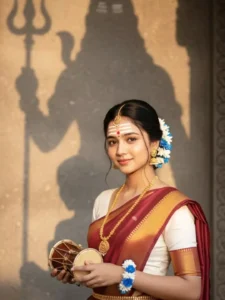
CREATE a realistic image of this girl WEARING ROSEWOOD colour SAREE WITH GOLDEN border AND WHITE BLOUSE. WEAR GOLden jhumke, necklace, mangtikka AND WHIte, blue FLOWER BRACELET. MATA PARVATI TILAK ON HER FOREHEAD. HAIR STYLED WITH A BUN, decored With Blue And White Flower. She HOLDING A DAMRU AND SLIGHTLY Tiled to camera.the lighting is warm.a large Mahadev(Shiva)shadow on a textured wall behind her
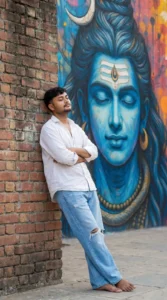
a full-body realistic wide-angle photograph of a stylish young man standing and leaning against a wall with his eyes closed and arms crossed and leg-crossed in a peaceful pose. behind him is a massive, vibrant mural of lord shiva face with looking at him. the man is wearing a loose oversized white bottom-down aesthetic shirt, sleeve rolled, light blue wide-leg jeans with ripped knees with barefoot.he has voluminous, messy dark wavy hair with a clean taper fade on the sides and is wearing
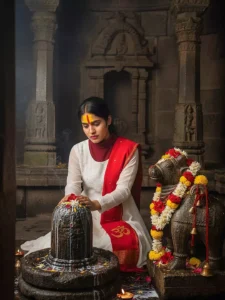
Create an ultra-realistic hyperdetailed shot of a girl(the reference image given) she is in said pose doing rudrabhishek with milk with both her hands on an ancient stone shivaling. Near that a ancient stone Nandi maharaj statue is placed, which is also decorated. She is looking down.Her forehead is decorated with a bright yellow red tilak. She is wearing white georgette anarkali full sleeves salwar suit The "ॐ" written scarf of red. Face don't change 100% original The girls sitting below should be seen doing sad prayers.
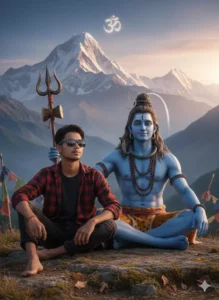
A realistic cinematic devotional scene:
A young boy wearing black sunglasses, red and black checkered shirt, and black jeans, sitting barefoot on rocky ground in the Himalayan mountains.
Beside him sits Lord Shiva, blue-skinned, divine and calm, holding a trident (Trishul), wearing rudraksha beads, tiger-skin cloth, and a gentle smile.
Lord Shiva’s hand is placed protectively on the boy’s shoulder, showing blessing and companionship. Snow-covered mountains in the background 🕉️
How To Create Image With Gemini Mahashivratri Ai Photo Editing Prompts
To create an ai image for Shivaratri, you need to use Gemini, which gives us the best results. To use it, copy the prompt, click the Create Your Image button, and then visit the official Gemini website. Log in and paste the prompt. Then, use the plus button to add a selfie or clear face image. The better the image, the better the match will be. Now, click the Generate button and wait a few moments. Your Shivaratri ai image will be ready.
Conclusion
Just like that, you too can now create trending ai images for Shivaratri. I’ve explained the entire process to you, so you shouldn’t have any problems or confusion. If you’re looking for new trending photo or video editing tutorials, you can visit our website. I hope you’ve understood what I’ve taught you.
