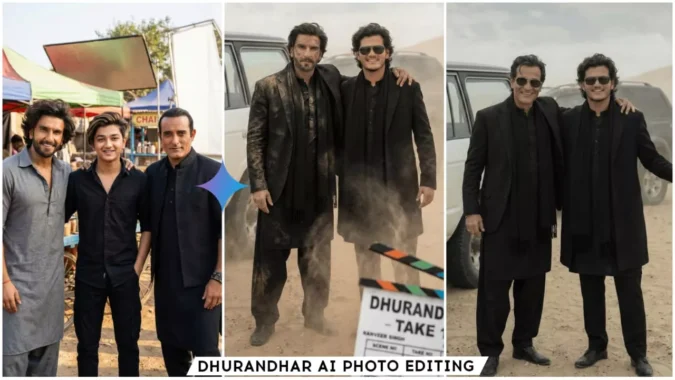
Dhurandhar Ai Photo Editing Prompts Google Gemini – Friends, a very good Bollywood movie called Dhurandhar was released just a few days ago, and it’s going viral these days. People are creating AI images of this movie and sharing them on social media, and these images are getting a lot of likes. So, if you also want to create AI images like those from the Dhurandhar movie, I will teach you how in this article. After reading this article, you too can create your own Dhurandhar AI images. So, friends, read this article and use the information provided to create your own images.
Details Of Dhurandhar Ai Photo Editing Prompts Google Gemini
Let’s talk about this editing technique. In this tutorial, we’ll show you how to create realistic images similar to the viral AI-generated images from the movie “Dhurandhar.” You’ll be able to create images of yourself taking a selfie with Ranveer Singh, standing with Akshay Khanna, or even getting your picture taken with both of them on a movie set. You can also create an image in the same style as a very popular viral image of Akshay Khanna. We’ll be using Google Gemini to create all of these images. I’ll provide you with the prompts, and with their help, you’ll be able to create these new trending images. Let’s find out how.
Why We Should Use Google Gemini
Friends, we’re using Gemini because we won’t find a better tool to create realistic images that look absolutely real. All the images currently going viral on social media are created with the help of Gemini. And creating AI images with Google Gemini is very easy; the process is also very simple. We can create many images for free using Gemini. We just need to know how to write prompts. And you can leave the worry about prompts to us. I will give you trending prompts that are always based on trending topics, and you can copy them from here. So friends, in the next paragraph, I will teach you how to use Gemini and guide you step-by-step on how to use it.
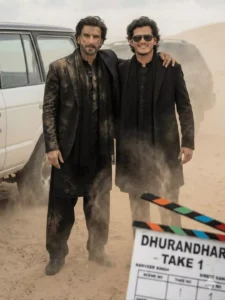
Create this image, look like I am on a Dharandha. movie shoot at Ranbir sing on it on like same black outfit with dust on face and like movie shoot begins the movie recently released Dhurandhar make it professionally with same face consistency only add Ranveer Singh
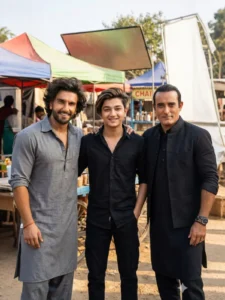
Hyper realistic 8k resolution, natural photo.
A real behind-the-scenes film shoot photo from the movie "Dhurandhar", outdoor location, daylight, natural cinematic lighting, shallow depth of field, realistic shadows, Three people standing together
naturally. Center - Me:
Face exactly same as my reference photo
Outfit: black denim jacket, black t-shirt, black baggy jeans, chunky white sneakers.

Slight smile, relaxed natural pose. Left side Actor 1: Face exactly same as reference image. Same hairstyle as reference. Outfit: black kurta, black pajama, black stole/scarf, black outer layer.
Black rectangular sunglasses. Right side - Actor 2: Face exactly same as reference image.
Same long hairstyle and same beard as reference. Outfit: brown traditional kurta and brown salwar.
Brown boots. Black aviator sunglasses. All outfits, hairstyles and sunglasses must be exactly the same as reference images. all faces match refrences images
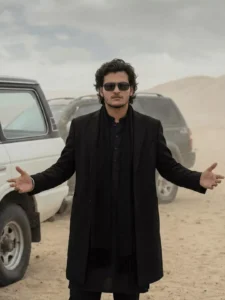
Ultra-realistic cinematic photograph of a stylish young man standing in a desert environment, wearing an all-black outfit: black traditional long coat over a black kurta, black scarf draped around the neck, black trousers. He has medium-length wavy dark hair, light stubble, sharp facial features, and is wearing dark rectangular sunglasses. His arms are extended outward with palms slightly open, confident and calm posture.
Background shows sandy desert dunes under an overcast sky, with two off-road SUVs partially visible behind him, white and dark colored vehicles parked at an angle. Natural soft daylight, muted tones, dusty atmosphere, shallow depth of field. Shot on DSLR, 85mm lens, t/ 2.8, high resolution, ultra-detailed textures, realistic skin tones, cinematic color grading, professional fashion photography, centered composition, eye-level angle, photorealistic, 1st image is the reference for angle and position and second image is my face and i want image in 9:16 ratio.
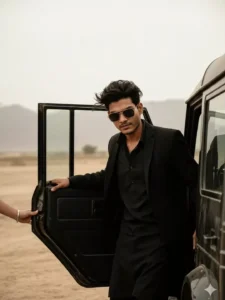
Luxury SUV is parked behind him. The background is dusty with soft cloudy skies and muted beige tones. Cinematic lighting, shallow depth of field, realistic photography, 4K ultra-detailed, moody Bollywood movie scene, dramatic atmosphere, professional color grading.
How To Create Image With Dhurandhar Ai Photo Editing Prompts Google Gemini
Friends, creating images with Google Gemini is very easy. You just need to read these instructions carefully, and then you can easily create any image on your phone. Let me explain. First, copy any prompt, as we will use it to create our own image. Now, open Gemini. You can find it on the Play Store, or you can click on the “Create Your Image” button above to go to the Gemini website. Log in there. Now, paste the prompt into the box. Then, use the “+” icon to add an image that includes your face. Make sure the image only contains your face; if there are multiple faces, Gemini won’t give the correct result. So, add an image of your face. Now, click on the send button. You will have to wait a few moments. Your realistic image will be created, featuring you alongside someone like Ranveer Singh or Akshay Khanna, similar to the Dhurandhar AI images that are going viral.
Conclusion
This is how you can create your own AI-generated image, and the entire process is completely free. You just need to follow the steps, and you too can create your image for this popular movie. People are loving this movie, and they are also enjoying creating AI images related to it. Hopefully, you understood everything. We hope you liked this article, and please don’t forget to share it.
