Raksha Bandhan Ai Photo Editing Prompt – Hello friends, welcome to today’s new article. Friends, in today’s article, we will teach you photo editing on a new trend. Friends, as you all know that the festival of Rakshabandhan is about to come and preparations for the festival have already begun. People have started editing photos for it on social media. This is a festival of brothers and sisters.
And if you want to make a photo of it, then friends, in today’s article, I am going to teach you a very selective photo editing for Rakshabandhan. Through this, you can make a creative Rakshabandhan photo from your normal selfie or clear photo and in this photo, you are going to make it with the help of eye. The process is absolutely easy. If you follow this article, then it will tell you how to create a photo with the help of Eye, which means you will be able to easily create a photo of Rakshabandhan.
About Raksha Bandhan Ai Photo Editing Prompt
Friends, as I told you that we are going to create a photo on the festival of Rakshabandhan and friends, you all know that Rakshabandhan is the holy festival of brother and sister. So, this festival is just a few days away and people have already started editing it. People want to create photos and share them easily on social media, so friends, in this photo editing, we will see that you can easily create a realistic Rakshabandhan photo from your normal photo.
In this, you will be seen getting a Rakhi tied on your wrist or you will be seen giving a gift to your sister or you will be seen wearing a white dress on the day of Rakshabandhan. You can easily create such different looks by editing photos. In this article, you are being given different prompts with the help of which you have to create your image and the process will also be explained to you in this article. Stay tuned.
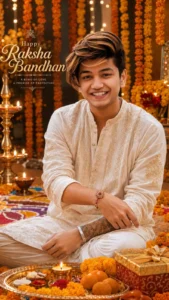
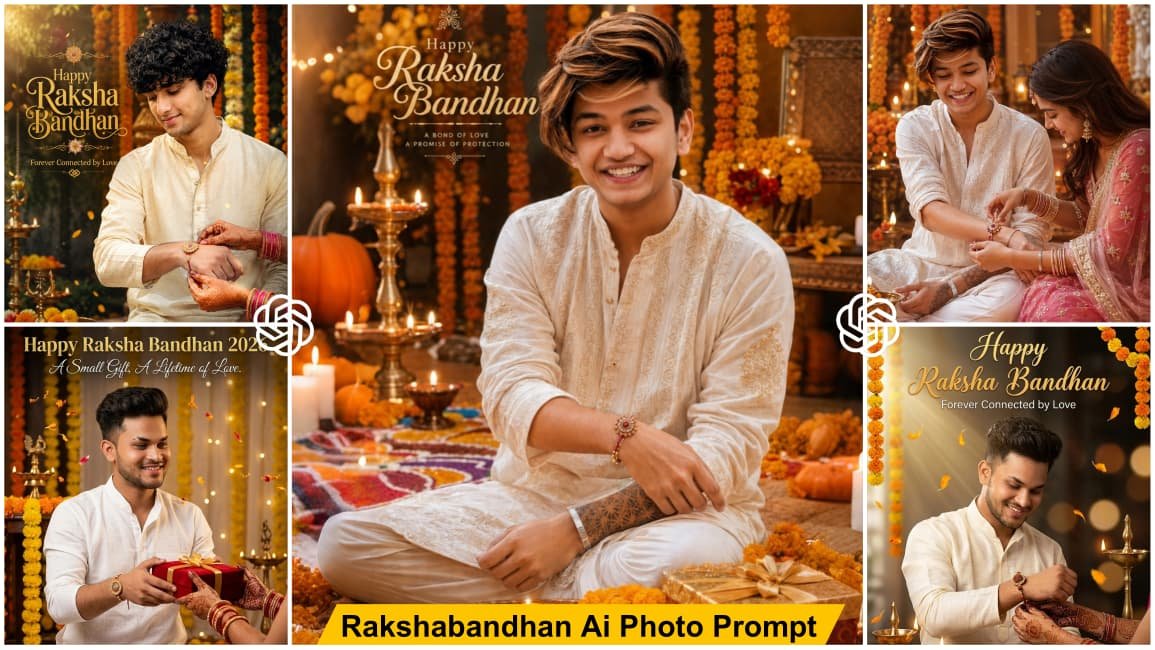
Create an ultra-realistic 3D Raksha Bandhan portrait using the uploaded reference photo. Preserve the face, hairstyle, beard, skin tone, and identity exactly. Show the young Indian man wearing a premium white embroidered kurta with a beautifully tied Rakhi on his wrist, smiling confidently. Background decorated with marigold flowers, diyas, rangoli, festive lights, and a pooja thali. Warm golden lighting, cinematic HDR, DSLR quality, realistic details, masterpiece, 8K, vertical 9:16. 🎁
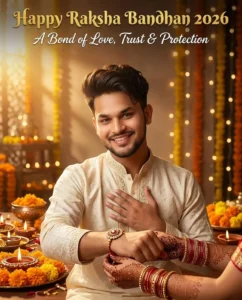
Create an ultra-realistic Raksha Bandhan 2026 poster using the uploaded reference photo. Preserve my face, hairstyle, beard, skin tone, and identity 100%. A young Indian man wearing an elegant cream kurta smiles warmly while extending his right wrist toward the camera. Only his sister's graceful mehndi hands with red-gold bangles gently tie a luxurious rakhi. His left hand rests over his heart with a thankful smile. Luxury festive décor with diyas, marigold flowers, fairy lights, warm golden sunlight, creamy bokeh, DSLR 85mm, HDR, ultra-realistic, 8K, vertical 4:5. Add elegant typography: *"Happy Raksha Bandhan 2026"* in luxurious gold lettering at the top and *"A Bond of Love, Trust & Protection"* below in stylish white script.
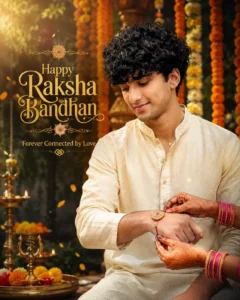
Create an ultra-realistic Raksha Bandhan 2026 poster using the uploaded reference photo. Preserve my face 100%. A young Indian man in an ivory kurta gently looks down at his wrist with a heartfelt smile while only his sister's beautifully decorated mehndi hands tie a premium rakhi. Rich marigold decorations, floating flower petals, brass diyas, soft sun rays, cinematic bokeh, DSLR 85mm, HDR, photorealistic, premium editorial quality, 8K, vertical 4:5. Add premium typography: *"Happy Raksha Bandhan"* in elegant saffron-gold calligraphy with *"Forever Connected by Love"* beneath it.
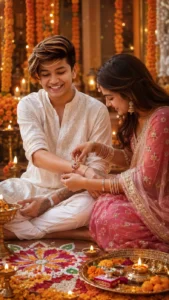
Create an ultra-realistic 3D Raksha Bandhan portrait using the uploaded reference photo. Preserve the face and identity exactly. Show a young Indian man in a white embroidered kurta while his sister, dressed in a traditional pink lehenga, lovingly ties a Rakhi on his wrist. Decorate the background with marigold flowers, rangoli, diyas, festive lights, and a pooja thali. Warm golden lighting, cinematic HDR, DSLR quality, realistic details, 8K, vertical 9:16.
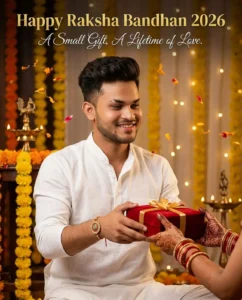
Create an ultra-realistic Raksha Bandhan 2026 poster using the uploaded reference photo. Preserve my face, hairstyle, beard, skin tone, and identity 100%. A stylish young Indian man wearing a premium white linen kurta smiles warmly while presenting an elegant red velvet gift box with a golden ribbon toward his sister. Only his sister's graceful mehndi hands with traditional red-gold bangles are visible reaching forward to receive the gift. The rakhi is already tied on his wrist. Rich marigold decorations, brass diyas, floating flower petals, warm golden fairy lights, cinematic festive atmosphere, DSLR 85mm, f/1.8, HDR, ultra-sharp, realistic skin and fabric textures, premium editorial photography, 8K, vertical 4:5. Add elegant gold typography at the top: *"Happy Raksha Bandhan 2026"* and below it in refined white script: *"A Small Gift, A Lifetime of Love."*
How To Create Raksha Bandhan AI Photo?
Now friends, let’s talk about how you can create this Raksha Bandhan AI photo. As I have shared different image prompts above, you can choose whichever image style you like and first copy its prompt. You can easily copy the prompt using the copy button. After that, you need an AI tool to create the image. You can use ChatGPT or Google Gemini, whichever you prefer. I will explain the process using ChatGPT, although the process is almost the same in both tools.
First, copy the image prompt given in the article and open the ChatGPT application. Paste the copied prompt into the chat and then add your reference image. Using the Plus icon, upload a clear image of your face. After that, click on the Generate button and wait for a few moments. Your Raksha Bandhan AI photo will then be created. Depending on the prompt you selected, you may be shown tying a Rakhi on your wrist, giving a gift to your sister, or appearing in another Raksha Bandhan-style scene. In this way, you can create different types of Raksha Bandhan photos by using different prompts and your reference image.
Why This Photo Editing Is Going Viral?
Friends, the main reason this photo editing is going viral is that it is based on the festival of Raksha Bandhan. As you all know, Raksha Bandhan is a special festival that celebrates the beautiful bond between brothers and sisters. People celebrate this occasion by strengthening their relationship and sharing special moments with each other.
With Raksha Bandhan approaching, people have started creating creative AI photos related to the festival and sharing them on social media. Those who know about AI photo editing are easily creating their own Raksha Bandhan images and posting them online. Because of this, this type of Raksha Bandhan photo editing is becoming increasingly popular. If you were not aware of this trend before, you can now easily create your own Raksha Bandhan AI photo using a simple prompt and a reference image. Different image prompts are provided in this article, so you can choose your favorite style, create the image, and share it on social media as part of the Raksha Bandhan trend.
Conclusion
So friends, this is how you can easily create your own Raksha Bandhan AI Photo Editing. In this article, I have explained the complete process and also provided different image prompts that you can use to create your own Raksha Bandhan photos. If you have read the complete article, you must have understood the entire process, and now you can easily create different Raksha Bandhan AI images for free. You only need a suitable prompt and your reference image to create the photo. I hope you understood the process explained in this article and liked the way I explained it. If you enjoyed the article, please share it with your friends.