Google Gemini Selfie With Actors Ai Image Prompt – So friends, welcome to this article! Today, I’m going to teach you another new trending photo editing technique. This image is currently very popular on Instagram, and I’ll show you how you can create it in this article. So keep reading and follow along. These types of images are going viral on Instagram, and people are searching for prompts to create them, but they aren’t finding the right prompts to create the exact same image. That’s why they’re looking for prompts. If you also want to create such an image, you’ll need a prompt. In this article, I’m giving you 3 to 4 prompts along with example images. You can copy the prompt of the image you like and create it using Google Gemini. Let me explain the entire process in this paragraph. Keep reading!
Details Of Google Gemini Selfie With Actors Ai Image Prompt
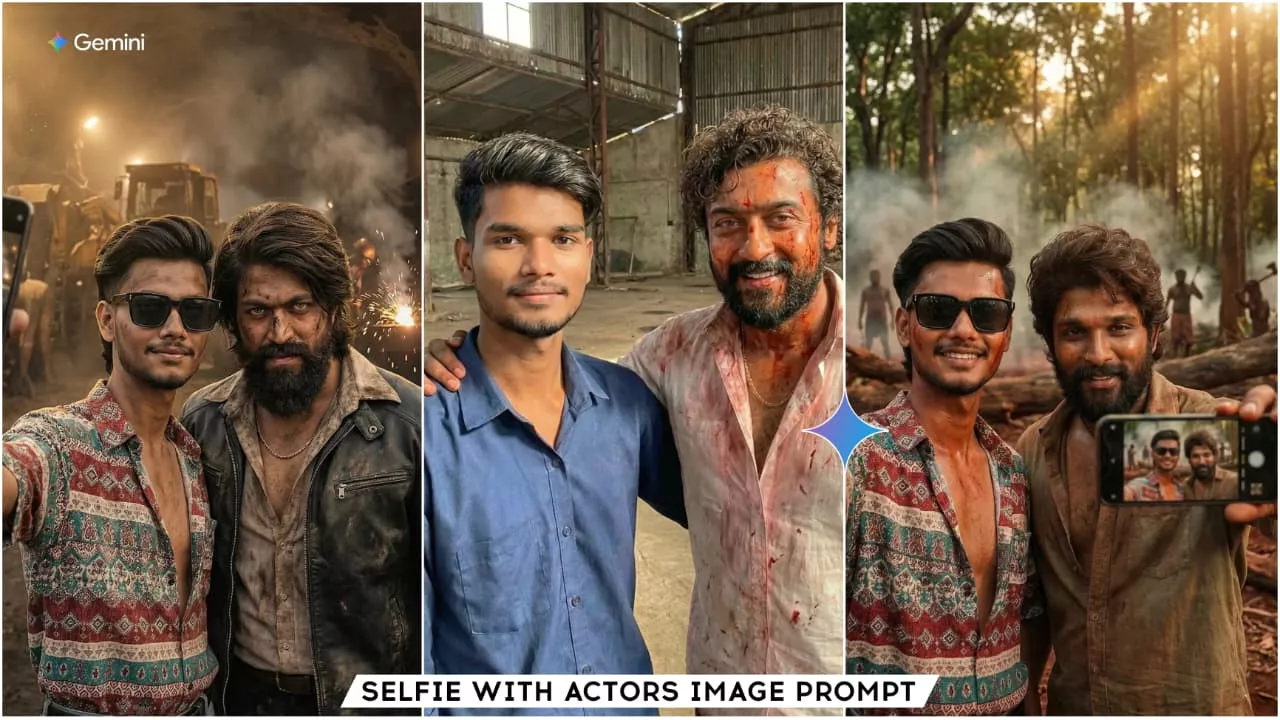
Friends, this editing involves taking selfies with South Indian cinema superstars. This editing shows you taking selfies with different actors on a movie set. Some images feature Allu Arjun, others Yash, and some even feature Suriya (as Rolex). The selfies look completely real; the actors are in their makeup for a scene, and we’ve taken the selfies at that moment. The background of the images will be a film set. The atmosphere will be similar to what’s shown in films like KGF or Pushpa. Friends, if you are a fan of these heroes, you should definitely create these selfie images. Because we can’t meet them in real life, now we can use AI to create our own edited photos.
Photo Editing Ai Tools
Friends, we can do this editing using various AI tools. For example, Grok, Chat GPT, Gemini, or DeepSeek. We can create our AI images with the help of these AI tools. Besides creating images, you can do many other things with these tools. If you need to know something or require information that you don’t have, these tools can easily provide it. Today, we will do the editing using Gemini. Because if you want to edit images in a realistic way, you should use Gemini. Gemini is a free tool, and you can easily create images with it. You can create as many images as you want. And you just need the prompts, which I always provide. You can copy them. Let me explain the process of using Gemini.
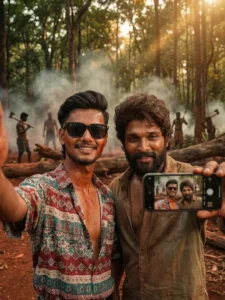
A hyper-realistic smartphone selfie from a dramatic action scene in the movie "Pushpa: The Rise".
A person taking a close group selfie with Allu Arjun in his Pushpa look - rugged, messy medium-length hair, thick beard, intense eyes, open shirt with dust and sweat, earthy village clothing.
Both are giving a slight confident smile, casual and fearless.
Background shows a movie scene environment:
dense forest area, red soil ground, fallen logs, smoke in the air, sunlight streaks passing through trees, silhouettes of gang members holding axes and tools in the distance.
Cinematic warm lighting with soft shadows, detailed textures, realistic sweat and dust on skin and clothes.
The person's face must match the uploaded image 100% (same facial features, skin tone, eye shape, eyebrows, nose, lips, hairstyle, beard).
The person stands close to Allu Arjun, holding the phone at arm's length for a selfie.
Ultra-realistic, 8K, sharp focus, no distortion, highly detailed.
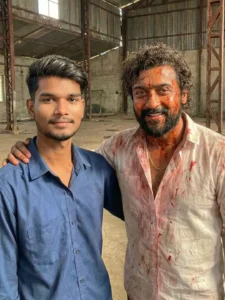
A hyper-realistic smartphone selfie in natural daylight, shot on iPhone 17 front camera. A person is standing beside Rolex (Suriya) from the movie Vikram.
The person's face must match the uploaded image 100% (same facial features, hairstyle, eyebrows, jawline, skin tone, lips).
Rolex looks completely realistic, photoreal human - no CGI or cartoon.
He has messy curly hair with natural volume, thick beard, intense eyes, natural wet + dry blood stains on his face, a wide confident smile.
He is wearing a real blood-stained white shirt with slightly open buttons, visible gold chain, sweat, skin pores, and natural body texture.
His expression is dominant and casual, standing shoulder-to-shoulder with the person.
Background: an industrial warehouse environment with real metal beams, natural sunlight leaking from above, subtle dust and smoke haze, realistic depth of field.
Skin tones must be natural, realistic reflections in eyes, natural shadows on face and shirt.
Ultra-photorealistic 8K, sha
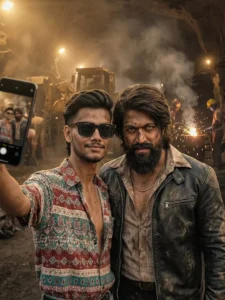
A hyper-realistic smartphone selfie from an intense action scene in the movie "KGF: Chapter 1".
A person taking a close group selfie with Yash in his Rocky Bhai look - long messy hair swept back, thick beard, intense eyes, black leather jacket or rugged open shirt, rough dust-covered skin, gold chain visible.
Both are showing a slight smirk, confident, powerful attitude.
Background shows a movie scene environment:
Kolar Gold Fields - dusty air, gold mining tunnels, huge industrial machines, heavy smoke, sparks from welding, miners in the distance holding pickaxes and tools, dramatic silhouettes.
Cinematic warm-golden lighting with deep shadows, realistic dust particles in the air, gritty textures on clothes and skin.
The person's face must match the uploaded image 100% (same facial features, skin tone, eye shape, eyebrows, nose, lips, hairstyle, beard).
The person stands close to Rocky Bhai, holding the phone at arm's length for a selfie.
Ultra-realistic, 8K, sharp focus, no distortion
How To Create Google Gemini Selfie With Actors Ai Image Prompt
So friends, I’ll explain in this paragraph how you can create your image with the help of Google Gemini. Here’s what you need to do: Look at the example images above. Choose the one you like, and copy the prompt provided below it. Then, click on the “Create Your Image” button to open the official Gemini website. If you already have the Gemini app, you can open that instead. It’s also available for free on the Play Store. After opening Gemini, paste the prompt you copied. Now, we’ll add a selfie or a clear image of your face so that the AI-generated image matches your face perfectly. To do this, click on the plus icon in the dashboard. After clicking, add your selfie or clear face image. The “Send” button will then appear. Click on the “Send” button and wait for a few moments. Google Gemini will then create an AI image for you that is completely realistic and matches your face. This all happens because of the prompt, and your face won’t match unless you use the correct prompt. That’s why you should copy the prompt from our website. This entire process is completely free, and you can generate your image for free this way.
Conclusion
Friends, I hope you liked my explanation and this article. Your image will now be created in a few minutes, and it will be completely realistic and match your face perfectly. If you want more such trending image prompts, please visit our website. We provide new trending prompts every day, which you can copy for free and use to create your own images.