Google Gemini Animal Lover Ai Photo Editing Prompts – If you love animals or are an animal lover, you’ll definitely like this article. Because today I’m going to teach you how to create an animal-themed photo edit that you can make in just one click. This editing process won’t take much time, and you can create your own AI image without any editing skills. Friends, this AI image will look completely realistic, and no one will be able to tell that it was created with AI. You’ll be creating these images using a prompt; I’ll provide you with the prompts, which you can use with the help of Google Gemini. Let me give you all the details; read the article.
Details Of Google Gemini Animal Lover Ai Photo Editing Prompts
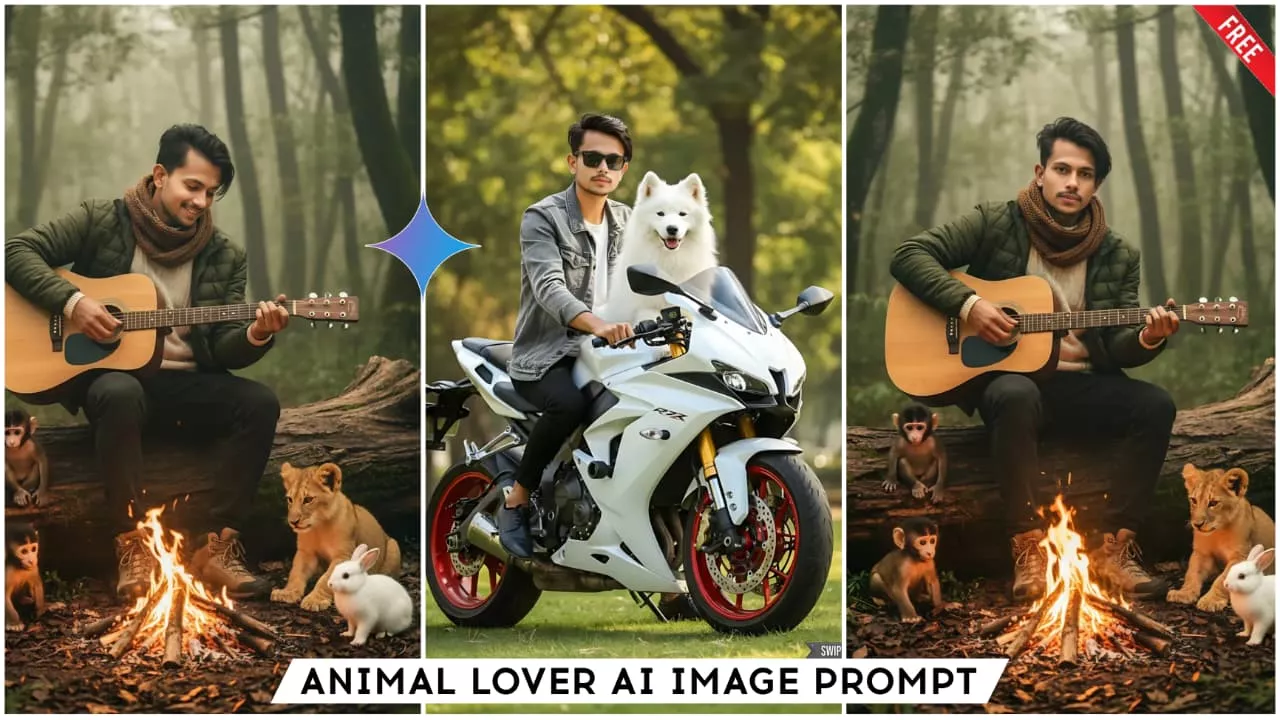
Look, we can create this kind of edit using just one of your selfies, you just need to know the process, which I’ll explain. First, let’s understand the details of this editing. In this edit, you’ll see a realistic image of yourself sitting with a guitar in your hands, with a fire burning in front of you and a cold atmosphere. Around you, there are small baby animals like rabbits, tigers, and monkeys. They are all sitting near you, and it looks like they are listening to the guitar music and warming themselves by the fire. The atmosphere looks very charming; the background is a forest, and it feels like a cold winter day, like the kind of cold you experience in January. This is the kind of realistic and animal-lover-themed edit you’ll get. So, if you also love animals, you should definitely try this.
Edit With Google Gemini
Friends, we’ll be doing this animal lover editing with the help of Google Gemini. Let me briefly tell you about it. Google Gemini is an AI tool created by Google, and with its help, we can create unlimited images that look completely realistic. To create images in Gemini, we need a prompt. It generates images based on the prompt we provide. If the prompt isn’t correct, the image won’t be accurate, so always write the prompt correctly when using Gemini. To create good images, you need to know how to write effective prompts. I provide Gemini prompts on this website, which you can copy to create realistic images, and this entire process is completely free. Using Google Gemini is also very easy. I’ll explain how to use it in the next paragraph. You can read that paragraph and then use Gemini. Below are some images and their prompts. Copy the prompt you like and create your own images.
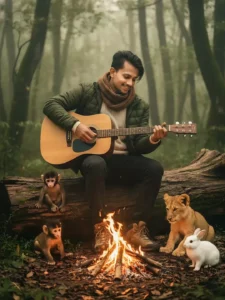
"hyper-realistic 8k cinematic lifestyle portrait of a rugged man wearing a cozy winter outfit - a thick knitted woolen sweater, a warm padded jacket, a soft muffler around his neck, and comfortable outdoor boots - sitting on a large fallen wooden log deep inside an extremely dense forest.
The jungle is lush, green, misty.
In front of him, a warm campfire glows, casting natural orange light on his cozy outfit and face. The man holds an acoustic guitar and gently plays music.
Around him, small forest animals sit peacefully listening to the melody: a baby monkey close to his leg, a baby bear resting near the log, a lion cub calmly sitting near the fire, and a cute rabbit on dry leaves.
The scene is highly realistic, DSLR-quality, natural lighting, real textures of fur, fabric, fire and forest. Shot with an 85mm lens, soft depth of field, warm golden tones, cozy atmosphere, real-photo look no Al feel. Use same to same face as given reference pic. Man looking guitar with soft smile."
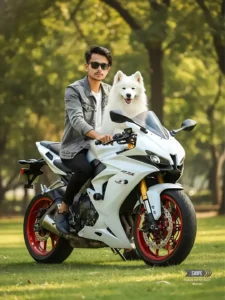
"Ultra-realistic 4K portrait of a stylish young man sitting on a white superbike in a green park. The man has a clean, sharp face, short styled hair, light beard, and is wearing black sunglasses. Use same to same face as given reference pic. He is dressed in a grey denim jacket over a white T-shirt and black pants with black shoes. A fluffy white Samoyed dog is sitting on the fuel tank/front area of the bike, looking forward with a happy expression.
The superbike is white with red alloy wheels, golden front suspension, aggressive headlights, and glossy body details.
Background has soft, blurred green trees with warm sunlight filtering through. Smooth grass field, natural shadows, DSLR-level depth of field, crisp details, cinematic lighting, HDR effect, hyper-realistic textures. Full-body shot of man, dog, and complete bike centered in frame."
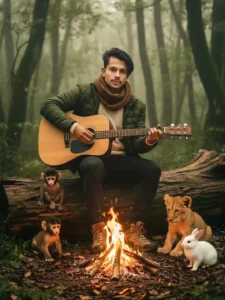
"hyper-realistic 8k cinematic lifestyle portrait of a rugged man wearing a cozy winter outfit - a thick knitted woolen sweater, a warm padded jacket, a soft muffler around his neck, and comfortable outdoor boots - sitting on a large fallen wooden log deep inside an extremely dense forest.
The jungle is lush, green, misty.
In front of him, a warm campfire glows, casting natural orange light on his cozy outfit and face. The man holds an acoustic guitar and gently plays music.
Around him, small forest animals sit peacefully listening to the melody: a baby monkey close to his leg, a baby bear resting near the log, a lion cub calmly sitting near the fire, and a cute rabbit on dry leaves.
The scene is highly realistic, DSLR-quality, natural lighting, real textures of fur, fabric, fire and forest. Shot with an 85mm lens, soft depth of field, warm golden tones, cozy atmosphere, real-photo look - no Al feel. Use same to same face as given reference pic. Man looking towards camera."
How To Create Image With Google Gemini Animal Lover Ai Photo Editing Prompts
Friends, you’ve seen the images and their prompts, but now the method of using them remains. I’ll explain it to you in this paragraph, so please read on. Using Google Gemini is very easy. After copying the prompt, you need to click on the red button above, which is the button for the Gemini website. This will take you to the official Gemini website. If you already have the Google Gemini application, you can use that as well. Here, we will paste the prompt and then add the image. We will add a clear image of our face using the ‘+’ icon so that our face matches the AI-generated image. After that, click on the send button and wait a few moments. Then Gemini will create an AI image for you, which will be exactly like the image provided in the article, and it will have your face in it. This process will take us hardly 1 to 2 minutes, and our professional image will be ready.
Conclusion
Now, thanks to AI photo editing, anyone can do professional editing themselves using their phone. Today’s generation really loves this kind of editing. So you should try it too. Friends, if you want more realistic prompts like these, keep visiting this website. I provide new and trending AI image editing prompts here. I hope you liked the article and my explanation.